Cad 3D Category

Showing posts with label V-Ray Rendering. Show all posts

Mastering Interior Design: How to Create a Stunning Living Area with SketchUp 3D

Thursday, October 1, 2026
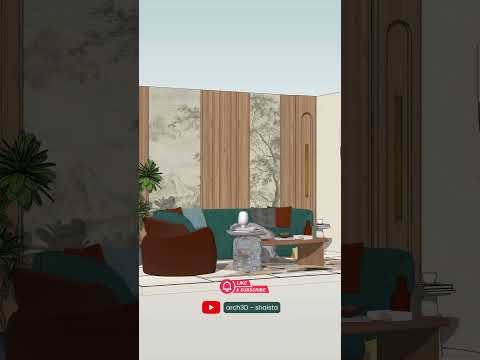
In the world of modern architecture and interior design, the ability to visualize a space before a single piece of furniture is moved is invaluable. Whether you are a professional designer or a DIY enthusiast, using SketchUp 3D has become the gold standard for turning abstract ideas into tangible, visual realities. Today, we’re diving into the process of creating a photorealistic living area that feels both cozy and professional.

The Foundation of Great Design

The journey begins with a solid model. A living area isn't just a box; it’s an ecosystem of light, space, and flow. By utilizing the intuitive tools within SketchUp 3D, you can quickly block out walls, windows, and doors to match real-world dimensions. The beauty of this software lies in its accessibility—you can move from a simple floor plan to a detailed 3D structure in a matter of minutes.

Once the shell of the room is complete, the focus shifts to the details. This is where you add character through furniture placement, decorative accents, and architectural moldings. A well-designed living room should balance aesthetics with functionality, and 3D modeling allows you to experiment with different layouts without any physical effort.

Bringing Realism with Textures and Lighting

A model is only as good as its finish. To truly impress clients or followers, you must bridge the gap between a digital sketch and a photorealistic image. This is where rendering engines like V-Ray come into play. By applying high-quality textures—such as grain-heavy wood for coffee tables or soft fabrics for sofas—you add layers of depth to your project.

Lighting is the final "secret ingredient." By simulating natural sunlight streaming through a window or the warm glow of an indoor lamp, you transform a flat model into a living, breathing space. Integrating these elements within your SketchUp 3D workflow ensures that your final render isn't just a picture, but an invitation into a home.

From Animation to Inspiration

Beyond static images, creating an animation of your living area model provides a cinematic experience. It allows viewers to "walk through" the space, feeling the scale and the atmosphere. By mastering these digital tools, you aren’t just drawing a room—you are storytelling. Start your next interior project today and see how digital modeling can elevate your creative vision to the next level.

Continue Reading | ความคิดเห็น

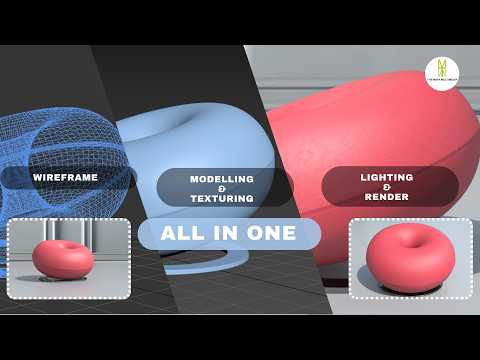
Master Furniture Visualization: How to Model, Texture, and Light a Sofa in 3ds Max

Saturday, September 19, 2026

Creating realistic 3D furniture is an essential skill for architectural visualization artists and interior designers alike. Whether you are building an arch-viz portfolio or creating high-end assets for virtual environments, mastering sofa design is a crucial milestone. In this tutorial walkthrough, we break down the complete end-to-end workflow for modeling, texturing, and lighting a stylish modern sofa using 3ds Max and V-Ray.

Step 1: Precision 3D Modeling

The foundation of any stunning 3D asset lies in clean topology and accurate proportions. Starting from simple primitive objects, we utilize advanced polygon modeling techniques in 3ds Max to block out the sofa frame, armrests, and seating cushions. To achieve photorealism, paying attention to tiny details is key—softening hard edges with chamfers, sculpting subtle organic wrinkles on the cushions, and ensuring proper real-world scale.

Step 2: Realistic Texturing with V-Ray

Once the base mesh is complete, the next step is applying believable shaders. Using V-Ray materials, you can recreate the authentic look and tactile feel of luxury fabrics, leather, or wooden legs. Proper UV unwrapping is critical here to prevent pattern stretching across curved surfaces. Utilizing diffuse, bump, and roughness maps together gives the fabric micro-details that react naturally to surroundings.

Step 3: Studio Lighting Setup

Lighting transforms a flat model into a dramatic, photorealistic image. By setting up a classic studio lighting environment with soft V-Ray lights, you can highlight the contours, fabric weaves, and subtle shadow falloffs of the furniture piece. Adjusting light temperatures and camera exposure helps capture the welcoming ambiance of a realistic living space.

Conclusion

Mastering these essential steps allows you to produce high-quality, professional furniture renders. With dedicated practice in 3ds Max, you can elevate your 3D modeling skill set and deliver incredible visuals for client projects or personal portfolios. Check out the full video tutorial to follow along with the step-by-step process!

Continue Reading | ความคิดเห็น

Popular Posts Today

 
Support : 3Dcadbrowser | Grabcad | 3Dcontentcentral | D | E | F | G
Copyright © 2028. Engineering 3DCad Appication - All Rights Reserved