Cad 3D Category

Showing posts with label 3D Design. Show all posts

Master Furniture Visualization: How to Model, Texture, and Light a Sofa in 3ds Max

Saturday, September 19, 2026
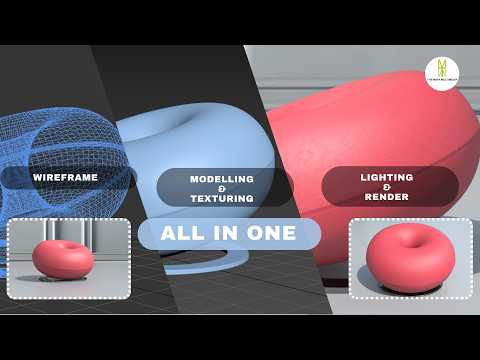
Creating realistic 3D furniture is an essential skill for architectural visualization artists and interior designers alike. Whether you are building an arch-viz portfolio or creating high-end assets for virtual environments, mastering sofa design is a crucial milestone. In this tutorial walkthrough, we break down the complete end-to-end workflow for modeling, texturing, and lighting a stylish modern sofa using 3ds Max and V-Ray.

Step 1: Precision 3D Modeling

The foundation of any stunning 3D asset lies in clean topology and accurate proportions. Starting from simple primitive objects, we utilize advanced polygon modeling techniques in 3ds Max to block out the sofa frame, armrests, and seating cushions. To achieve photorealism, paying attention to tiny details is key—softening hard edges with chamfers, sculpting subtle organic wrinkles on the cushions, and ensuring proper real-world scale.

Step 2: Realistic Texturing with V-Ray

Once the base mesh is complete, the next step is applying believable shaders. Using V-Ray materials, you can recreate the authentic look and tactile feel of luxury fabrics, leather, or wooden legs. Proper UV unwrapping is critical here to prevent pattern stretching across curved surfaces. Utilizing diffuse, bump, and roughness maps together gives the fabric micro-details that react naturally to surroundings.

Step 3: Studio Lighting Setup

Lighting transforms a flat model into a dramatic, photorealistic image. By setting up a classic studio lighting environment with soft V-Ray lights, you can highlight the contours, fabric weaves, and subtle shadow falloffs of the furniture piece. Adjusting light temperatures and camera exposure helps capture the welcoming ambiance of a realistic living space.

Conclusion

Mastering these essential steps allows you to produce high-quality, professional furniture renders. With dedicated practice in 3ds Max, you can elevate your 3D modeling skill set and deliver incredible visuals for client projects or personal portfolios. Check out the full video tutorial to follow along with the step-by-step process!

Continue Reading | ความคิดเห็น

Mastering Solid Modeling in CATIA V5: The Ultimate Multi-Section Solid Guide

Friday, September 18, 2026

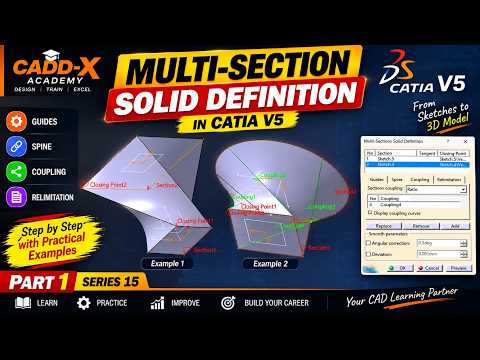
In the world of computer-aided design (CAD), mastering advanced solid modeling techniques is essential for creating complex, organic, and aerodynamic shapes. CATIA V5 remains an industry standard for engineers and designers, offering a vast array of powerful features. Among these, the Multi-Section Solid tool stands out as one of the most versatile functions for creating intricate 3D geometry between multiple profile sections.

Whether you are designing automotive body panels, turbine blades, or consumer products, understanding how to control cross-sectional transitions is crucial for clean, manufacturable models.

Understanding the Multi-Section Solid Tool

The Multi-Section Solid tool allows designers to build a solid body by connecting two or more planar profiles along a designated path. While basic extrusions and pads handle simple prismatic shapes, advanced solid modeling requires precise control over how surfaces blend between distinct cross-sections.

To achieve predictable, smooth geometry without unwanted twists or surface tears, you must master three fundamental elements: Spines, Guides, and Coupling.

Key Components: Spines, Guides, and Coupling

  • Spines: The spine acts as the structural backbone of your multi-section feature. It controls the orientation and normal alignment of intermediate sections along the shape's length, ensuring balanced material distribution.
  • Guides: Guide curves are user-defined paths that govern the outer boundaries of the solid. They dictate how the edge profile morphs from one section to another, giving you complete engineering control over the outer contour.
  • Coupling: Coupling establishes how points on one profile connect to corresponding points on the next profile. Proper coupling prevents surface distortion, self-intersection, and topological errors.

Best Practices for Error-Free Geometry

To achieve consistent success in your solid modeling projects within CATIA V5, keep these practical tips in mind:

  1. Align Closing Points: Always verify that the closing point vectors on all selected profiles point in the same relative direction. Opposite directions will cause the feature to twist or fail entirely.
  2. Maintain Vertex Consistency: Whenever possible, create profiles with an equal number of vertices. This simplifies point coupling and ensures cleaner geometry.
  3. Ensure Smooth Guide Curves: Make sure your guide curves maintain tangency and continuity to prevent sharp breaks or surface errors on the final model.

Conclusion

Mastering the Multi-Section Solid tool is a key milestone for any CAD designer. By understanding how to combine spines, guides, and coupling options effectively, you can tackle complex design challenges and produce professional-grade 3D models with confidence.

Continue Reading | ความคิดเห็น

Mastering Solid Modeling: A Step-by-Step CATIA V5 Tutorial for Beginners

Wednesday, September 16, 2026

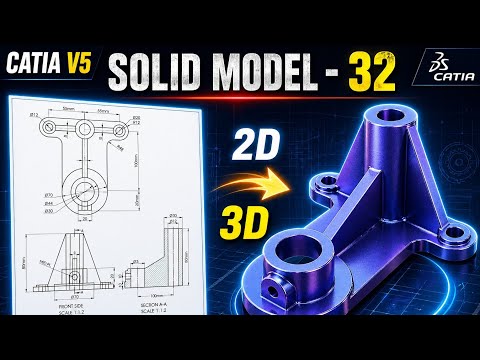
CATIA V5 remains one of the most powerful and widely used software suites in the aerospace and automotive industries. For aspiring engineers and designers, mastering solid modeling is a fundamental step toward professional proficiency. In this latest installment of our tutorial series, we break down Exercise 32, focusing on the seamless transition from a 2D engineering drawing to a fully realized 3D part.

Transitioning from 2D Drawings to 3D Geometry

The core of any mechanical design starts with a blueprint. Understanding how to interpret dimensions, tolerances, and views is crucial before you even touch the software. In this tutorial, we demonstrate how to analyze a 2D technical drawing and plan your sketching strategy. By identifying the primary features of the part first, you can build a more stable and editable model.

The Core Principles of Solid Modeling

In the world of Computer-Aided Design (CAD), solid modeling is about more than just creating shapes; it is about defining the volume, mass, and physical properties of a component. Using CATIA V5’s Sketcher workbench, we start by creating a "constrained" profile. This ensures that your design remains robust—meaning that if you change a single dimension later, the entire model updates correctly without errors.

Once the 2D sketch is finalized, we utilize essential features such as the Pad tool to extrude material and the Pocket tool to remove it. These boolean-like operations are the building blocks of 3D design, allowing you to sculpt your model with surgical precision.

Refining Your Professional Workflow

To move from a beginner to an intermediate level, you must focus on design intent and tree organization. This tutorial covers how to properly name your features and organize your Part Body. We also explore the application of dress-up features like fillets and chamfers, which provide the final engineering touches necessary for a production-ready model.

Whether you are a student or a professional looking to refresh your skills, practicing these exercises is the most effective way to gain confidence in the software. By the end of this guide, you will have a much stronger grasp of solid modeling and be better prepared to tackle complex industrial design challenges.

Continue Reading | ความคิดเห็น

How to Easily Inspect Complex 3D CAD Assemblies Without Heavy Software

Saturday, September 12, 2026

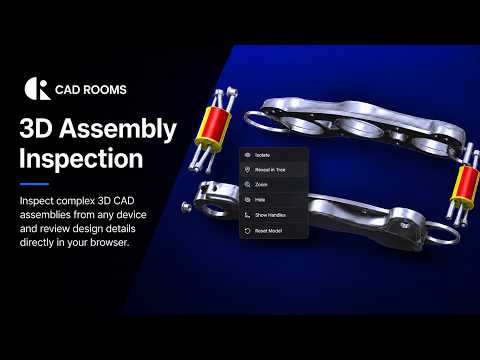
Opening complex engineering files often presents a major hurdle for non-designers, project managers, and client stakeholders. Traditionally, inspecting intricate design files required high-end hardware and expensive, specialized software installations. However, modern cloud technology is changing the game, making it simpler than ever to view and analyze 3D CAD models directly within your web browser.

Browser-Based CAD Inspection Made Simple

With cloud-native platforms like CAD ROOMS, inspecting detailed CAD assemblies no longer requires heavyweight desktop applications. You can open, rotate, zoom, and inspect complex assemblies effortlessly from virtually any device—whether it’s a desktop, laptop, or tablet.

By removing the barrier of software installation, teams can instantly review designs, double-check measurements, and verify assembly structures without waiting for file conversions or managing bulky software updates. This seamless access opens up new possibilities for frictionless cross-departmental collaboration.

Key Advantages for Modern Engineering Teams

Moving your inspection workflow to the browser provides several crucial benefits:

  • Zero Installation Required: Access your models instantly without downloading heavy software or managing licenses across multiple devices.
  • Cross-Platform Flexibility: Whether you are on Windows, macOS, or a mobile operating system, browser-based inspection ensures universal compatibility.
  • Enhanced Collaboration: Share interactive models with clients, suppliers, and internal teams without worrying about whether they have the right viewer installed.
  • Smooth Performance: Process and inspect massive 3D CAD assemblies effortlessly, backed by efficient cloud rendering technologies.

Streamline Your Review Workflow Today

Whether you are an engineer looking to quickly verify a design component or a project manager presenting a concept to clients, cloud-based inspection tools offer the speed and flexibility modern workflows demand. By viewing 3D CAD files directly in the browser, you eliminate technical friction, save valuable time, and keep your projects moving forward seamlessly.

Continue Reading | ความคิดเห็น

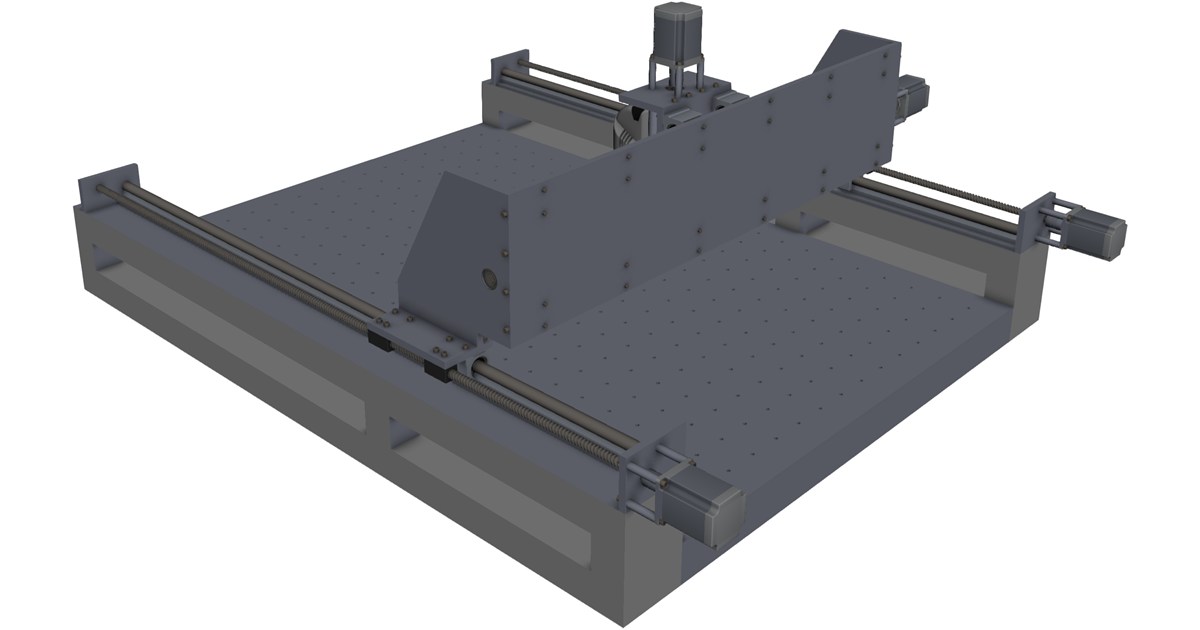
Download High-Precision 3-Axis CNC Machine CAD Model (Multi-Format)

Thursday, September 3, 2026

Preview Image

Elevate your engineering and manufacturing simulations with this highly detailed 3-Axis CNC Machine 3D CAD Model. Designed for accuracy, this model is ideal for mechanical engineers, machine designers, digital twin development, and workshop layout planning.

Key Features & Specifications

  • Detailed Geometry: Includes realistic structural assemblies, spindle mounting, linear motion guides, and frame components.
  • Multi-Software Support: Pre-formatted for seamless import into leading CAD/CAM software packages.
  • Versatile Applications: Ideal for motion simulation, toolpath collision checking, workshop floor layout design, and educational displays.

Supported CAD File Formats

This 3-axis CNC model can be integrated into your workflow using popular standard formats, including:

  • SolidWorks (.sldprt, .sldasm)
  • AutoCAD (.dwg, .dxf)
  • Autodesk Inventor (.ipt, .iam)
  • PTC Creo / Pro-ENGINEER
  • Siemens NX
  • CATIA
  • Universal/Neutral Formats: STEP, IGES, ACIS (.sat)

Download this essential 3D model today to streamline your machine design and virtual commissioning processes.


Continue Reading | ความคิดเห็น

Unlocking the Power of 3D CAD: How Mechanical Assemblies Come to Life

Wednesday, August 26, 2026

In the fast-paced world of modern engineering and product design, static 2D blueprints are rapidly becoming a thing of the past. Today, complex machinery and intricate mechanical parts rely heavily on sophisticated visualization tools to ensure perfection before physical production ever begins. This is where modern 3D CAD (Computer-Aided Design) technology plays a pivotal role, transforming abstract concepts into fully interactive, functional mechanical assemblies.

Understanding Mechanical Assemblies in Motion

Designing an individual component is only the first step in product development. The true test of engineering lies in how various moving parts interact within a complete mechanism. Through digital assembly, designers can simulate motion, test real-world constraints, and identify potential mechanical interferences early in the design cycle. Seeing a machine come alive through realistic 3D animations not only accelerates the design process but also drastically reduces costly manufacturing errors.

Why Mastering 3D CAD is Essential for Engineers

Whether you are a student, a professional mechanical engineer, or a passionate hobbyist, developing strong proficiency in 3D CAD opens up limitless possibilities. Modern software allows creators to:

  • Build highly precise 3D geometry and parametric models.
  • Perform virtual stress tests and dynamic motion simulations.
  • Streamline collaboration between design, engineering, and manufacturing teams.

With step-by-step practical learning, mastering complex concepts like gear mechanisms, linkage assemblies, and automated machinery becomes significantly easier and more accessible.

Transform Your Creative Workflow Today

Bridging the gap between theoretical engineering and practical application requires hands-on practice and clear, accessible visual guides. By leveraging modern digital tools and high-quality tutorial content, you can easily turn complex mechanical challenges into seamless, practical design solutions. Start exploring realistic mechanical models today and elevate your engineering capabilities to the next level!

3D CAD
Continue Reading | ความคิดเห็น

Level Up Your 3D CAD Skills: Speed Battles, Tutorials, and Expert Tips

Thursday, August 20, 2026

Are you ready to test your speed, efficiency, and precision in digital design? Whether you are a seasoned engineer, a passionate designer, or a student looking to enhance your skill set, pushing your boundaries in 3D CAD can be both thrilling and immensely rewarding.

Speed modeling battles have rapidly become the ultimate arena for creators to showcase their expertise under pressure. However, behind every lightning-fast modeler is a solid foundation built on proven workflows, keyboard shortcuts, and clever techniques.

The Thrill of Competitive Speed Modeling

What separates an average designer from a lightning-fast pro? It usually comes down to tool mastery, feature organization, and strategic planning before drawing the very first sketch. In fast-paced modeling competitions, participants face off against the clock to recreate complex parts accurately in record time.

Watching or participating in these live battles offers a unique window into how experts solve complex geometric problems on the fly. You get to observe different design approaches, clever constraint applications, and minimal-step techniques that you can immediately integrate into your own workflow.

Essential Tips to Supercharge Your Design Workflow

Speed is not merely about clicking fast; it is about working smart. To significantly boost your efficiency in 3D CAD, consider implementing these practical strategies into your routine:

  • Master Keyboard Shortcuts: Customizing and memorizing hotkeys for your most frequently used commands saves precious seconds on every feature setup.
  • Plan Before You Sketch: Spend a few moments analyzing the overall geometry and base features of a model before starting. A logical feature tree simplifies future edits and avoids rebuild errors.
  • Leverage Constraints Wisely: Fully constraining your sketches early on prevents unexpected model breaks down the line, saving you substantial troubleshooting time.

Join the Community and Test Your Limits

Whether you want to compete against top designers in live speed challenges or simply polish your workflow through step-by-step tutorials, continuous practice is key. Mastering 3D CAD software is an ongoing journey of learning, adapting, and refining your technique. Stay curious, keep practicing, and don't hesitate to put your modeling skills to the ultimate test!

3D CAD
Continue Reading | ความคิดเห็น

How to Download and Install 3D CAD Software: Complete Setup Guide for Windows and Mac

Whether you are an engineer, architect, or digital artist, having a reliable 3D CAD software package installed on your computer is essential for bringing your creative visions to life. From initial product drafting to complex architectural modeling, modern design programs rely on smooth integration with your operating system to deliver optimal performance.

However, navigating the download and installation process across different operating systems like Windows and macOS can sometimes present unexpected challenges. In this comprehensive setup guide, we will walk you through the essential steps to get your design software up and running without hassle.

Step 1: Check System Requirements and Prepare Your Device

Before beginning any installation, ensure your computer meets the hardware specifications required by your design program. High-performance drafting tools depend heavily on processing power, RAM, and graphics acceleration.

  • Windows Users: Verify that your graphics card drivers are fully updated to prevent rendering glitches and performance lag during intensive tasks.
  • macOS Users: Ensure operating system compatibility, particularly if your device uses Apple Silicon (M1/M2/M3 chips), to confirm whether the installer runs natively or requires translation layers like Rosetta 2.
  • Disk Space: Clear out temporary files and ensure you have sufficient free SSD or HDD space for both the installer and workspace cache.

Step 2: Downloading and Running the Installer

To protect your system from security risks, always download your 3D CAD software directly from official, trusted sources or authorized distributors.

  1. Locate the downloaded file (.exe for Windows or .dmg/.pkg for macOS) in your system’s Downloads directory.
  2. Launch the installer and grant the necessary administrator privileges when prompted by your operating system.
  3. Follow the installation wizard, choosing your preferred installation path and selecting any essential add-ons or driver plugins required for your workflow.

Step 3: Licensing and Initial Performance Optimization

Once the setup process is complete, launch the application for the first time. You will typically be prompted to sign in with your user account, enter a valid license key, or activate an educational or trial license.

After activating your product, take a few minutes to navigate to the preferences menu. Adjust your default unit measurements, graphics performance settings, and autosave intervals to match your hardware capabilities. With your 3D CAD environment fully configured, you are ready to jump straight into your next modeling project!

3D CAD
Continue Reading | ความคิดเห็น

Free Low Poly Cannon 3D Model – Game Ready Asset Download

Wednesday, May 27, 2026

Looking for a high-quality free 3D model to enhance your next game project or architectural visualization? Today, we are featuring a meticulously crafted Low Poly Cannon that combines vintage aesthetics with modern performance optimization.

Product Overview

This Cannon 3D model is designed specifically for creators who need lightweight yet visually appealing assets. Whether you are building a pirate-themed adventure or a historical battlefield simulation, this model fits perfectly into any low-poly environment.

Key Features:

  • Optimized Geometry: Low poly count, ideal for mobile games and real-time engines.
  • High-Quality Textures: Detailed textures that maintain clarity even at close range.
  • Versatile Use: Ready for Unity, Unreal Engine, and Blender.
  • Professional Design: Based on historical artillery designs with a stylized touch.

Get This Model For Free

You can download the files directly from the original creator on TurboSquid via the link below:


DOWNLOAD FREE 3D CANNON

Free 3D Models, Low Poly, Weapon, Cannon, Game Assets, TurboSquid, 3D Design

Continue Reading | ความคิดเห็น

Download Free 3D Carcaj Model - High-Quality Medieval Quiver Asset

Tuesday, May 26, 2026

Looking for a high-quality Free 3D Model to enhance your digital project? Today we are featuring the Carcaj (Quiver) 3D model, a meticulously crafted asset perfect for medieval-themed games, historical visualizations, or character design.

Product Overview

This 3D asset represents a traditional "Carcaj" or quiver, designed with attention to detail and texture. Whether you are building a fantasy world or a realistic historical scene, this model provides the professional touch your workflow needs.

Key Features:

  • Realistic Textures: Detailed materials that react beautifully to lighting.
  • Optimized Geometry: Suitable for both high-end rendering and real-time engines.
  • Versatile Use: Perfect for arch-viz, game development, and 3D printing enthusiasts.

Ready to Download?

You can access this amazing 3D asset directly from the official source on TurboSquid.

GO TO DOWNLOAD PAGE

How to use this 3D Asset

Simply download the files, import them into your favorite 3D software (such as Blender, 3ds Max, or Maya), and apply the included textures. Its game-ready nature ensures that it won't bog down your performance while maintaining visual fidelity.


Free 3D Model, Medieval, Quiver, Game Assets, TurboSquid, 3D Design

Continue Reading | ความคิดเห็น

Free 3D Water Bomb Model - Game Ready Low Poly Asset

Monday, May 18, 2026

High-Quality Free 3D Water Bomb Model

Looking for high-quality 3D game assets for your next project? This Free 3D Water Bomb model is an excellent choice for developers and digital artists. Designed with precision, this model is optimized for real-time engines and architectural visualization.

Model Specifications

  • Asset Type: Water Bomb / Military Asset
  • Format: Compatible with major 3D software
  • Style: Realistic / Low Poly optimized
  • License: Check source link for details

Why Use This Model?

This 3D asset provides a perfect balance between visual detail and performance. Whether you are creating a cinematic scene or a mobile game, the water bomb 3D model ensures professional results without the high cost of custom modeling.

Ready to Download?

Get this model directly from the official source at TurboSquid.

DOWNLOAD FREE 3D MODEL

3D Model, Free Download, Game Assets, Low Poly, Water Bomb, TurboSquid, 3D Design

Continue Reading | ความคิดเห็น

Free Axe 3D Model - Low Poly Game Ready Asset - Download Now

Saturday, May 16, 2026

High-Quality Free Axe 3D Model for Gaming & Rendering

Looking for a professional free 3D model to enhance your next project? This medieval-style axe is meticulously crafted, featuring high-quality textures and optimized geometry. Whether you are developing a fantasy game or working on a digital visualization, this game-ready 3D asset provides the perfect balance between detail and performance.

Key Features:

  • Optimized Mesh: Perfect for real-time engines like Unity and Unreal Engine.
  • High-Resolution Textures: Detailed materials for realistic wood and metal finishes.
  • Universal Formats: Compatible with major 3D software such as Blender, Maya, and 3ds Max.
  • SEO Friendly: Designed as a versatile low-poly 3D model for various digital environments.

Technical Specifications:

Category Tools / Weapons
Format Multiple Formats (OBJ, FBX, MAX)
License Check Source Site

Click the button below to access the free 3D model download:

DOWNLOAD FREE 3D MODEL

3D Model, Free Download, Game Assets, Axe 3D, Low Poly, TurboSquid, 3D Design

Continue Reading | ความคิดเห็น

Free M67 Fragmentation Grenade 3D Model - High Quality Game Assets

Thursday, May 14, 2026

Looking for a high-quality Free 3D Grenade Model for your next game development or visualization project? This M67-style fragmentation grenade is meticulously designed to provide realism and detail without compromising performance.

Key Features of this 3D Model:

  • Realistic Design: High-fidelity textures and accurate proportions.
  • Game-Ready: Optimized geometry for seamless integration into Unity or Unreal Engine.
  • Multiple Formats: Compatible with major 3D software like Blender, 3ds Max, and Maya.

Whether you are creating a military simulation or an action-packed shooter, this free 3D asset is a perfect addition to your digital armory. Download it now and enhance your 3D environment with professional-grade props.

Ready to use?

Click the button below to access the download page on TurboSquid.

DOWNLOAD FREE 3D MODEL

Free 3D Model, Grenade 3D, Game Assets, Military Props, TurboSquid, 3D Design

Continue Reading | ความคิดเห็น

Free Low Poly FAMAS 3D Model – Game Ready Asset Download

Wednesday, May 6, 2026

High-Quality Low Poly FAMAS 3D Model for Your Projects

Are you looking for a professional-grade weapon asset for your next game development project? Look no further. We are featuring a Low Poly FAMAS 3D model that is perfectly optimized for real-time engines and high-performance environments.

Key Features of this 3D Asset:

  • Optimized Geometry: Low poly count, ideal for mobile and PC games.
  • Detailed Textures: High-quality finishes that maintain visual fidelity without sacrificing performance.
  • Format Compatibility: Available in industry-standard formats for easy import into Unity, Unreal Engine, or Blender.

This free 3D model of the iconic FAMAS assault rifle is a must-have for developers building FPS, military simulations, or tactical shooters. Its sleek design and efficient polygon usage make it a versatile asset for any modern-day combat setting.

Download Information

You can download this asset directly from the source link below:

DOWNLOAD FREE 3D MODEL

Why Use Low Poly Models?

In modern game design, managing the "poly budget" is crucial. Using a low poly FAMAS model ensures that your game runs smoothly even with multiple assets on screen, providing a seamless experience for your players.

Continue Reading | ความคิดเห็น

Free VZ 61 Skorpion Submachine Gun 3D Model – High Quality Download

Thursday, April 30, 2026

Detailed VZ 61 Skorpion 3D Model for Digital Projects

Enhance your 3D scenes with this highly detailed VZ 61 Skorpion submachine gun model. Known for its compact design and iconic look, this model is perfect for game development, historical reconstructions, or cinematic visual effects.

Key Features:

  • Realistic Topology: Clean mesh flow suitable for close-up renders.
  • Authentic Design: Based on the real-world dimensions of the VZ 61 Skorpion.
  • Versatile Use: Compatible with major 3D software like Blender, Maya, and 3ds Max.

Whether you are building a first-person shooter (FPS) or a military simulation, having a high-quality 3D firearm asset adds a layer of realism that captivates your audience. This asset is a must-have for any digital armory.

Get This 3D Asset

You can view and download the model from the official link below:

DOWNLOAD FREE 3D MODEL

3D Models, Free Download, VZ 61 Skorpion, Weapon Assets, Game Ready, TurboSquid, 3D Design

Continue Reading | ความคิดเห็น

Free 3D Modern Weapons Pack - High-Quality Game Assets Download

Tuesday, April 28, 2026

Looking for high-quality assets to enhance your next project? We are excited to feature an incredible Free 3D Modern Weapons Pack originally hosted on TurboSquid. This collection is perfect for game developers, animators, and digital artists who need realistic weaponry without the premium price tag.

Professional Grade 3D Weapon Models

This pack includes a variety of modern firearms designed with attention to detail. Whether you are building a first-person shooter (FPS) or a cinematic scene, these assets provide the realism required for modern hardware standards. The models are optimized for performance while maintaining visual fidelity.

Key Features:

  • Multiple Formats: Compatible with major 3D software like Blender, 3ds Max, and Maya.
  • Detailed Textures: Ready for high-definition rendering.
  • Game Ready: Optimized polygon count for real-time engines like Unity and Unreal Engine.

Why Use These Assets?

Finding quality free 3D models can be time-consuming. By utilizing this weapon pack, you save hours of modeling time, allowing you to focus on level design and gameplay mechanics. These assets are a great addition to any digital armory.

Download Link

Access the full pack directly on TurboSquid via the link below:

DOWNLOAD FREE 3D MODELS

Free 3D Models, Modern Weapons, Game Assets, TurboSquid, 3D Design, Weapons Pack, FBX, OBJ
Continue Reading | ความคิดเห็น

Free 3D Model: Military Equipment Case - High-Quality Asset for Games & Rendering

Sunday, April 26, 2026

Looking for a high-quality military case 3D model to enhance your realistic environment? This professional-grade asset is perfect for game developers, architectural visualizers, and 3D artists who need detailed equipment storage units.

Product Overview

This military equipment case features a rugged design, reflecting authentic tactical gear storage used in defense and field operations. Whether you are building a battlefield scene or a high-tech laboratory, this model adds a layer of industrial realism to your project.

Key Features

  • Detailed Geometry: Clean mesh suitable for close-up renders.
  • Optimized for Games: Great for Unreal Engine and Unity projects.
  • Realistic Textures: Includes surface details that react naturally to lighting.
  • Versatile Use: Can be used as a loot box, supply crate, or environmental prop.

Specifications & Compatibility

This model is hosted on TurboSquid, one of the most trusted marketplaces for 3D assets. Ensure you check the available formats (such as .max, .obj, or .fbx) to match your 3D software like Blender, Maya, or 3DS Max.

DOWNLOAD FREE 3D MODEL HERE

*Redirects to the official asset page on TurboSquid.

Continue Reading | ความคิดเห็น

Free Military Case 3D Model - High-Quality Asset for Games & Rendering

Looking for a high-quality Military Case 3D Model to enhance your next project? Whether you are working on a realistic war scene, a first-person shooter game, or a detailed product visualization, this asset is a must-have.

Professional Military Storage Box 3D Asset

This detailed military container features a rugged design, perfect for tactical environments. It has been crafted with precision to ensure it meets the standards of modern 3D rendering and game engines. By using this free 3D model, you can save hours of modeling time while maintaining professional visual quality.

Key Features:

  • Authentic tactical design for military simulations.
  • Optimized geometry for efficient performance.
  • Versatile use: props, environment dressing, or loot crates.
  • Available for download via industry-standard platforms.

If you are searching for premium-grade 3D assets for free, this military case is a fantastic addition to your digital library. Download it now and start creating stunning visuals!

3D Models, Free Download, Military Asset, Game Ready, TurboSquid, 3D Design
Continue Reading | ความคิดเห็น

Free Weapon Pack 3D Model – High-Quality Game Assets Download

Thursday, April 23, 2026

Enhance Your Projects with this Professional Weapon Pack

Are you looking for high-quality free 3D models for your next game development or animation project? This Weapon Pack 3D model offers exceptional detail and optimized geometry, making it perfect for both AAA titles and indie projects.

Key Features of this 3D Weapon Pack:

  • Highly Detailed Textures: Realistic finishes that react beautifully to lighting.
  • Optimized Topology: Performance-friendly for real-time engines like Unity and Unreal Engine.
  • Multiple Formats: Compatible with major 3D software such as Blender, Maya, and 3ds Max.

This 3D asset is an essential addition to any digital artist's library. Whether you are creating a first-person shooter or a cinematic scene, these assets provide the realism and quality you need.

Ready to Download?

Get this amazing asset directly from the source:

DOWNLOAD FREE 3D MODEL

3D Models, Free Download, Weapon Pack, Game Assets, TurboSquid, Low Poly, 3D Design

Continue Reading | ความคิดเห็น

Free 3D Model: Low-Poly PBR Fire Axe – Game Ready Asset

Sunday, April 19, 2026

Looking for a high-quality, free 3D fire axe model for your next game project or digital scene? This professional-grade asset is designed with performance and realism in mind, making it perfect for real-time engines and close-up renders.

Product Overview

This Low-poly PBR Fire Axe features optimized geometry and high-quality textures. Whether you are building a survival horror game or a firefighting simulation, this 3D asset provides the realistic detail you need without compromising on performance.

Key Features:

  • Style: Realistic / Game Ready
  • Workflow: PBR (Physically Based Rendering)
  • Geometry: Low-poly optimization for smooth performance.
  • Application: Ideal for Unreal Engine, Unity, and Blender.

Technical Specifications:

Category Rescue Gear / Tools
Format Multiple Formats (Check via link)

Free 3D Models, Game Assets, Fire Axe, Low Poly, PBR Textures, 3D Design

Continue Reading | ความคิดเห็น

Popular Posts Today

 
Support : 3Dcadbrowser | Grabcad | 3Dcontentcentral | D | E | F | G
Copyright © 2028. Engineering 3DCad Appication - All Rights Reserved