Cad 3D Category

Showing posts with label Autodesk Maya. Show all posts

Unlock the Magic of Autodesk 3D: Essential Low-Poly Modeling Tips

Saturday, November 14, 2026
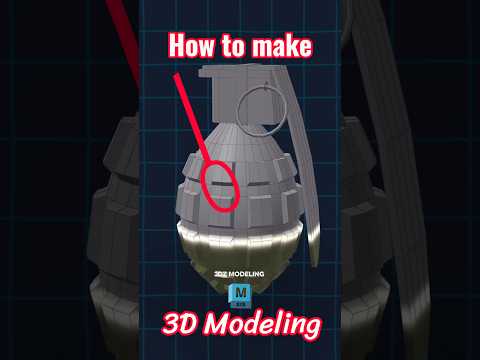
Have you ever watched a digital artist transform a simple geometric block into a captivating visual piece and thought, "How did they do that?" That instant transformation—the "wait for it" moment—is what makes digital art so satisfying. Whether you are a beginner stepping into digital art or a seasoned creator looking to refine your skills, leveraging Autodesk 3D software like Maya opens up endless creative possibilities.

In this article, we’ll explore the fundamentals of low-poly modeling and how you can streamline your workflow to create stunning 3D assets effortlessly.

The Charm of Low-Poly Design in Maya

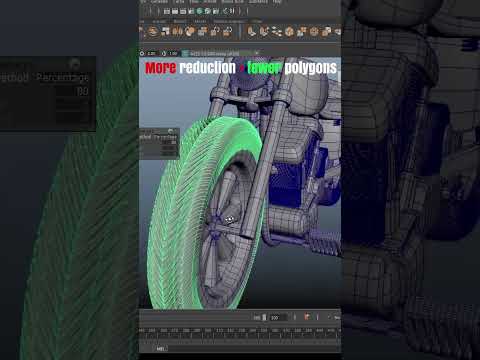
Low-poly modeling isn't just a trendy aesthetic choice; it is a fundamental technique used extensively in video game development, real-time rendering, and stylized animations. By focusing on essential geometry and minimal polygon counts, artists can craft clean, lightweight models without sacrificing artistic style or visual impact.

When modeling in Maya, mastering simple tools like extrusions, bevels, and edge loops forms the bedrock of great design. The efficiency of low-poly assets allows artists to quickly prototype ideas, build expansive environments, and prepare models for seamless rigging and motion.

Bringing Your Creations to Life

Modeling is only half the journey. What truly captivates an audience is seeing a static mesh spring into motion. Utilizing Autodesk 3D tools enables animators to set keyframes, refine motion curves, and apply dynamic lighting that instantly elevates low-poly scenes into eye-catching animations.

Here are a few essential tips to boost your modeling workflow: - Maintain Clean Topology: Ensure your mesh uses clean quads to make rigging and animating much smoother. - Optimize Your UV Maps: Efficient UV unwrapping ensures textures fit perfectly without stretching across low-poly surfaces. - Play with Lighting: Simple multi-light setups can add dramatic depth, shadows, and mood to stylized renders.

Final Thoughts

Mastering 3D creation takes patience and practice, but with the powerful capabilities of Autodesk 3D software, you can turn basic geometric shapes into extraordinary artwork. Keep experimenting with low-poly techniques, practice your animation timing, and enjoy the process of creating visuals that make your audience pause and take notice!


Continue Reading | ความคิดเห็น

Master the Art of Exhibition Stand Design with Maya 3D

Tuesday, September 29, 2026

In the fast-paced world of trade shows and corporate events, first impressions are everything. To stand out in a crowded hall, you need more than just a booth—you need a visual experience that captures the essence of a brand. This is why professional designers are increasingly turning to Maya 3D to create high-end, immersive exhibition stands that wow clients and visitors alike.

Why Precision Matters in Exhibition Design

When designing an exhibition stand, you aren't just creating a digital image; you are drafting a physical structure that must be structurally sound and aesthetically pleasing. Using Maya 3D allows for a level of precision that is essential for architectural modeling. Whether you are designing sleek, minimalist displays or complex, multi-story pavilions, the software’s robust toolset ensures that every measurement is accurate and every curve is perfectly rendered.

Bringing Concepts to Life with Realistic Lighting

One of the most challenging aspects of event design is communicating how a space will feel once it is built. This is where the power of rendering comes into play. By utilizing Maya 3D in conjunction with industry-standard render engines like Arnold, designers can simulate realistic lighting environments. You can showcase how spotlights will interact with various materials, how glass partitions will reflect the surroundings, and how branding colors will appear under different lighting conditions. This level of realism is crucial for securing client approval and ensuring the final build matches the initial vision.

Streamlining Your Creative Workflow

The exhibition industry moves quickly, often requiring designers to turn around concepts in a matter of days. To stay competitive, it is important to build an efficient workflow. By mastering the specialized tools within this software, you can create a library of modular assets—such as furniture, lighting fixtures, and AV equipment—that can be reused across multiple projects. This not only saves time but also allows you to focus more on the creative aspects of the design rather than the repetitive technical tasks.

Whether you are a seasoned 3D artist or an aspiring event designer, learning to harness the capabilities of these tools will elevate your portfolio and help you deliver world-class exhibition spaces.

Continue Reading | ความคิดเห็น

Mastering Digital Creation: Why Maya 3D is the Industry Standard for Artists

Saturday, September 19, 2026

In the rapidly evolving world of digital media, one software package stands out as the ultimate powerhouse for professionals: Maya 3D. From blockbuster Hollywood films to top-tier AAA video games, this comprehensive suite from Autodesk has become synonymous with high-end visual effects, complex character animation, and stunning digital environments.

The Versatility of Professional Modeling

Whether you are an aspiring artist or a seasoned professional, the modeling capabilities found within this software are unparalleled. It provides a robust set of tools for polygonal, NURBS, and subdivision surface modeling. Its ability to handle intricate details while maintaining a streamlined workflow allows artists to bring even the most complex concepts to life. With features like the integrated Modeling Toolkit and advanced UV mapping, the transition from a simple primitive shape to a hyper-realistic character is smoother than ever. Using Maya 3D allows for a level of precision that is essential for modern CGI production.

Industry-Leading Animation and VFX

Beyond static models, the real magic happens when things start to move. The platform is widely regarded as the gold standard for character rigging and animation. Its sophisticated physics engines and procedural toolsets allow for the creation of breathtaking effects—from realistic water simulations to complex motion graphics. For VFX artists, the software offers a deep level of control over lighting, shading, and rendering, ensuring that every frame meets the highest cinematic standards.

Getting Started on Your Creative Journey

Learning a tool this powerful can seem daunting at first, but the rewards are well worth the effort. The community surrounding the software is vast, offering countless tutorials and resources for those looking to sharpen their skills. By mastering the fundamentals of the interface and understanding the core production pipeline, you can open doors to career opportunities in film, gaming, and architectural visualization.

If you are ready to push the boundaries of what is possible in the digital realm, embracing the tools provided by Maya 3D is the definitive first step toward becoming a world-class creator. Whether you are interested in shorts, feature films, or interactive media, the power to create is at your fingertips.

Continue Reading | ความคิดเห็น

Popular Posts Today

 
Support : 3Dcadbrowser | Grabcad | 3Dcontentcentral | D | E | F | G
Copyright © 2028. Engineering 3DCad Appication - All Rights Reserved