Cad 3D Category

Showing posts with label Maya 3D. Show all posts

The Magic of Facial Rigging: How to Bring Characters to Life in Maya 3D

Monday, November 2, 2026
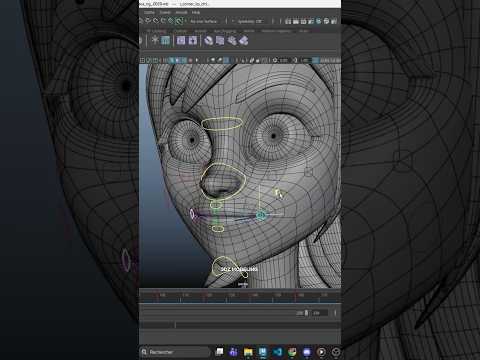
In the world of 3D animation, creating a compelling character model is only half the journey. The true magic happens when that character begins to express emotion, speak, and truly connect with the audience. Facial rigging is the vital bridge between a static 3D mesh and a living, breathing digital persona. By setting up complex expressions and intuitive controls, artists using Maya 3D can give digital characters a soul and bring their stories to life.

Why Facial Rigging Matters in Animation

Facial rigging involves constructing a digital skeleton and control system beneath a character's facial mesh. While body rigging focuses on large movements like walking or running, facial rigging deals with micro-expressions—the subtle arch of an eyebrow, the slight smirk of a lip, or the gentle squint of the eyes.

Without a well-designed rig, even the most detailed 3D sculpt remains stiff and emotionless. A high-quality facial rig allows animators to convey delicate storytelling nuances, transforming a generic digital asset into an unforgettable character that resonates deeply with viewers.

Crafting Expressive Rigging Systems in Maya 3D

When it comes to professional character setup, Maya 3D remains the industry-standard software for artists and animation studios worldwide. Its robust toolset enables riggers to combine blend shapes (shape keys) with joint-based rigging techniques seamlessly.

Blend shapes work exceptionally well for sculpting specific organic facial targets, such as smiles, frowns, or phonemes for lip-syncing. Meanwhile, joint-based controls provide dynamic flexibility for structural movements, such as jaw opening, tongue articulation, and cheek deformation. Utilizing the powerful node hierarchy and custom control curves within Maya 3D, riggers can build clean, user-friendly control panels that make the animation workflow smooth and expressive.

Elevate Your 3D Character Work

Mastering the art of facial rigging requires patience, continuous practice, and a keen eye for human anatomy and movement. Observing real-life facial mechanics and translating those subtle details into digital controls is what separates beginner work from professional quality.

Whether you are a hobbyist or an aspiring professional, taking the time to master character rigging will dramatically elevate the production value of your projects. Keep pushing your creative boundaries, study facial anatomy, and continue exploring the endless possibilities of 3D animation!


Continue Reading | ความคิดเห็น

Mastering the Smooth Feature in Maya 3D: Why You Must Use It With Caution

Thursday, October 22, 2026

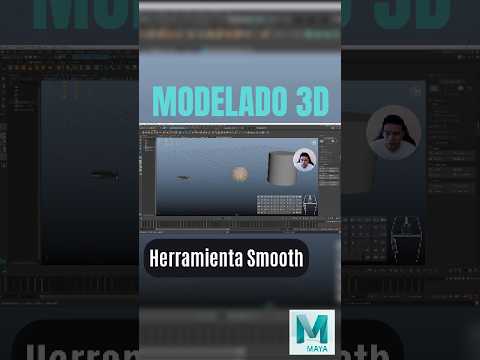
If you are diving into the world of 3D modeling, chances are you have encountered the Smooth button in Autodesk Maya. At first glance, it feels like magic: with a single click, a blocky, low-poly model turns into a sleek, organic surface. However, many beginners fall into the trap of using this feature without fully understanding what happens under the hood when working in Maya 3D.

What Does the Smooth Tool Really Do?

When you apply a Smooth operation, Maya does not just change how light hits your mesh—it actively modifies the underlying geometry. The Smooth function subdivides every face on your model into multiple smaller faces while averaging the position of the vertices.

In simple terms, it softens your shapes by creating actual, physical polygons. While this increases visual detail, it also dramatically inflates your overall polygon count.

The Hidden Dangers of Over-Smoothing

Why should 3D artists be careful with this tool? The main issue comes down to performance and workflow flexibility. Every time you subdivide geometry in Maya 3D, you exponentially increase the complexity of your scene.

  • Performance Drops: High polygon counts can slow down viewport performance, increase render times, and potentially cause software crashes.
  • Loss of Control: Once you smooth a mesh and clear your history, editing the base shape becomes exponentially harder. Tweaking a few vertices on a low-poly mesh is quick; adjusting hundreds of vertices on a smoothed mesh is a nightmare.
  • Pipeline Issues: For real-time applications like game engines, overly dense geometry creates severe optimization problems.

Smart Alternatives and Best Practices

To maintain full control over your models, adopt these professional practices:

  1. Use Display Smooth Preview (The '3' Key): Pressing 3 in Maya toggles a non-destructive smooth preview without altering your underlying geometry. This allows you to inspect your curved surfaces while keeping the base mesh easy to edit (press 1 to return to flat display).
  2. Smooth at the End: Only apply actual geometry subdivisions when you are completely finished editing the form, or during the high-poly creation stage for map baking.
  3. Maintain Clean Topology: Ensure your mesh consists primarily of quads (four-sided polygons) before applying Smooth, as triangles and n-gons will cause severe shading artifacts.

Understanding how geometry subdivides is essential for anyone aiming to master Maya 3D. By using the Smooth tool intentionally rather than reflexively, you will keep your scenes lightweight, your workflows flexible, and your final models production-ready.

Continue Reading | ความคิดเห็น

Mastering the Art of Animation: A Comprehensive Guide to Maya 3D

Monday, October 12, 2026

The world of digital content creation has evolved rapidly, moving from simple 2D graphics to immersive, lifelike experiences. At the heart of this revolution is 3D animation, a field that combines technical precision with limitless artistic creativity. Whether you are an aspiring filmmaker, a game developer, or a hobbyist looking to bring your imagination to life, learning the right tools is the first step toward success.

Why Choose Maya 3D for Your Animation Journey?

When it comes to professional-grade software, Maya 3D stands as the industry standard. Used by top-tier studios like Disney, Pixar, and Sony Pictures, this software provides a robust suite of tools for modeling, simulation, and rendering. The reason many professionals prefer Maya 3D is its sheer versatility; it allows creators to handle everything from complex character rigging to hyper-realistic fluid simulations. For anyone serious about a career in visual effects or gaming, mastering this platform is often considered a prerequisite.

Getting Started with the Basics

Transitioning into the 3D space can feel overwhelming at first. However, the key is to break the process down into manageable stages. Every great 3D project follows a specific pipeline: 1. Modeling: Creating the basic shape and geometry of your object. 2. Texturing: Adding colors, patterns, and materials to make the model look real. 3. Rigging: Building a digital skeleton so the model can move. 4. Animation: Bringing the character or object to life through movement.

By focusing on these core pillars within Maya 3D, beginners can slowly build their confidence and move from creating simple spheres to complex, animated environments.

Tips for Faster Learning

To excel in 3D animation, consistency is more important than raw talent. Start by following structured tutorials that focus on the user interface and basic navigation. Don't be afraid to experiment with lighting and camera angles, as these elements significantly impact the final "feel" of your video. Furthermore, engaging with online communities and specialized courses can help you troubleshoot common rendering issues and stay updated with the latest industry plugins.

The journey into 3D creation is a marathon, not a sprint. With patience and the right tools, you can transform a blank digital canvas into a cinematic masterpiece. Start your journey today and unlock the incredible potential of professional animation.

Continue Reading | ความคิดเห็น

Mastering Digital Creation: Why Maya 3D is the Industry Standard for Artists

Saturday, September 19, 2026

In the rapidly evolving world of digital media, one software package stands out as the ultimate powerhouse for professionals: Maya 3D. From blockbuster Hollywood films to top-tier AAA video games, this comprehensive suite from Autodesk has become synonymous with high-end visual effects, complex character animation, and stunning digital environments.

The Versatility of Professional Modeling

Whether you are an aspiring artist or a seasoned professional, the modeling capabilities found within this software are unparalleled. It provides a robust set of tools for polygonal, NURBS, and subdivision surface modeling. Its ability to handle intricate details while maintaining a streamlined workflow allows artists to bring even the most complex concepts to life. With features like the integrated Modeling Toolkit and advanced UV mapping, the transition from a simple primitive shape to a hyper-realistic character is smoother than ever. Using Maya 3D allows for a level of precision that is essential for modern CGI production.

Industry-Leading Animation and VFX

Beyond static models, the real magic happens when things start to move. The platform is widely regarded as the gold standard for character rigging and animation. Its sophisticated physics engines and procedural toolsets allow for the creation of breathtaking effects—from realistic water simulations to complex motion graphics. For VFX artists, the software offers a deep level of control over lighting, shading, and rendering, ensuring that every frame meets the highest cinematic standards.

Getting Started on Your Creative Journey

Learning a tool this powerful can seem daunting at first, but the rewards are well worth the effort. The community surrounding the software is vast, offering countless tutorials and resources for those looking to sharpen their skills. By mastering the fundamentals of the interface and understanding the core production pipeline, you can open doors to career opportunities in film, gaming, and architectural visualization.

If you are ready to push the boundaries of what is possible in the digital realm, embracing the tools provided by Maya 3D is the definitive first step toward becoming a world-class creator. Whether you are interested in shorts, feature films, or interactive media, the power to create is at your fingertips.

Continue Reading | ความคิดเห็น

Download Fiat 131 Mirafiori Wagon 3D Model – Free TurboSquid File

Thursday, December 11, 2025

Looking for a high-quality Fiat 131 Mirafiori Wagon 3D model? This model is perfect for 3D artists, game developers, and automotive designers. It features precise detailing, realistic proportions, and is compatible with major 3D software.

Get the free Fiat 131 Mirafiori Wagon 3D file from TurboSquid now and enhance your project with a classic car design.

Features of Fiat 131 Mirafiori Wagon 3D Model

  • High-detail classic car 3D model
  • Compatible with Blender, 3ds Max, Maya, and Cinema 4D
  • Optimized polygon count for smooth performance
  • Ready for rendering, animation, and VR/AR applications

Why Choose This Fiat 131 3D Model?

This Fiat 131 Mirafiori Wagon 3D model is ideal for automotive simulations, advertising, and creative projects. Its accurate design makes it an excellent reference for classic car enthusiasts and designers.

Click here to download the Fiat 131 Mirafiori Wagon 3D model and bring your 3D projects to life!

Fiat 131 Mirafiori Wagon, 3D model, 3D download, classic car, TurboSquid, automotive 3D, 3D artists, 3D game assets, Blender 3D, 3ds Max 3D, Maya 3D, Cinema 4D


Continue Reading | ความคิดเห็น

Popular Posts Today

 
Support : 3Dcadbrowser | Grabcad | 3Dcontentcentral | D | E | F | G
Copyright © 2028. Engineering 3DCad Appication - All Rights Reserved