Cad 3D Category

Showing posts with label 3D Animation. Show all posts

Master 3D Animation: A Complete Guide to Creating and Monetizing Viral Content

Sunday, October 4, 2026
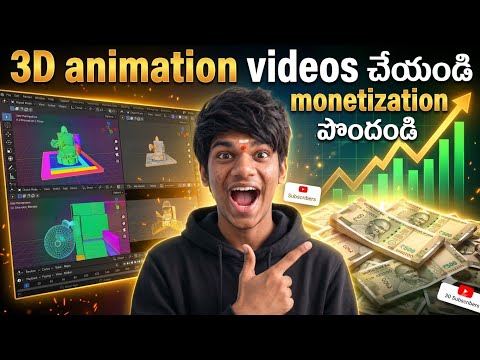
In the rapidly evolving world of digital content, visual storytelling has taken a massive leap forward. Among the most engaging formats available today, 3D animation stands out as a powerhouse for capturing audience attention and driving significant engagement. Whether you are a budding YouTuber or a digital marketer, learning how to create high-quality animated content is no longer a luxury—it is a vital skill for success.

The Rise of 3D Content in the AI Era

Gone are the days when you needed a massive studio and a team of experts to produce professional-grade visuals. With the advent of advanced AI tools and user-friendly software, creating 3D animation has become accessible to everyone. These tools allow creators to generate realistic characters, immersive environments, and fluid movements with just a few clicks. This shift has opened the doors for individual creators to compete with large production houses, bringing unique stories to life from the comfort of their homes.

How to Get Started with Your First Project

To begin your journey, you first need to identify the right tools that fit your workflow. Many modern platforms leverage artificial intelligence to automate the more technical aspects of the process, such as rigging and rendering.

  1. Scripting and Storyboarding: Every great video starts with a solid concept. Outline your story and visualize the scenes before you start animating.
  2. Character Design: Use AI-driven platforms to customize your characters. Focus on expressive features that resonate with your target audience.
  3. Animation and Voiceover: Add life to your characters by syncing their movements with high-quality voiceovers. This is where your 3D animation truly begins to take shape.

Strategies for Monetization

The ultimate goal for many creators is to turn their passion into a sustainable income. Once you have mastered the art of animation, there are several avenues to explore:

  • YouTube Partner Program: By creating consistent, high-quality animated series or educational content, you can qualify for ad revenue and channel memberships.
  • Freelancing: Many businesses are looking for talented animators to create promotional videos, social media ads, and product demos.
  • Brand Collaborations: As your influence grows, brands will pay a premium to be featured in your unique animated world.

By staying consistent and focusing on high-production value, you can transform your creative hobby into a profitable business. The world of digital media is waiting for your next big creation!


Continue Reading | ความคิดเห็น

Mastering Hand Gestures: How to Bring Your 3D Character to Life Without a Face

Friday, September 25, 2026

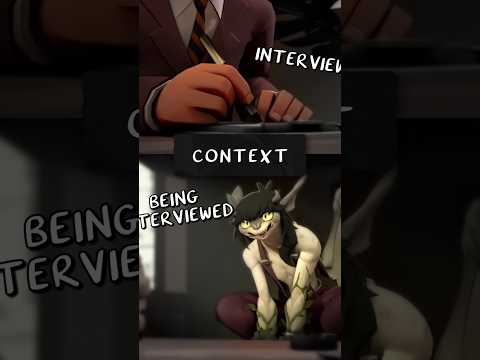
In the world of professional animation, we often rely heavily on facial expressions to convey emotion and intent. But what happens when the face is completely hidden? A recent viral short by "That Gray Cartoon Pony" provides a masterclass in a technique often overlooked by beginners: hand acting.

By analyzing the interviewer character in this short, we see a performance that is entirely driven by secondary motion and hand gestures. Even though we never see the character’s face, his personality, authority, and reactions are crystal clear. This serves as a vital lesson for anyone looking to add more depth and realism to their 3D character.

The Power of Non-Verbal Communication

Hands are the second most expressive part of the human body. When you are animating a 3D character, the hands shouldn't just be "there"—they should be actively participating in the conversation. In the analyzed footage, notice how the interviewer uses his hands to emphasize points, show hesitation, or even project a sense of professional boredom.

The weight and timing of these movements are what make the performance believable. If the hands move too fast, the character feels nervous; if they move with heavy, deliberate pauses, the character feels powerful. Mastering these nuances allows you to tell a story even when your character is partially off-screen or obscured by shadows.

Frame-by-Frame Intentionality

Great animation is a result of intentionality. When we look at this sequence frame-by-frame, it becomes evident that every finger pose is curated. The "acting" happens in the transitions—the way a hand relaxes after a gesture or how the fingers drum against a surface.

To ground your 3D character in a realistic environment, you must consider the "physics of emotion." This means understanding how tension in the shoulders flows down through the arms and manifests in the fingertips. By focusing on these secondary actions, you move away from "robotic" movement and toward a performance that feels organic and lived-in.

Conclusion: Lessons for Animators

The takeaway from this analysis is simple: don't ignore the hands. Whether you are working on a high-stakes action scene or a quiet dialogue-driven short, the way your character uses their hands can define their entire persona. Next time you sit down to animate, try turning off the head layer and see if your character’s body language can still carry the scene. If the hands can tell the story alone, you’ve truly mastered the craft.

Continue Reading | ความคิดเห็น

Master Ultra-Realistic 3D CAD Animation: Combining SolidWorks and Blender

Wednesday, August 19, 2026

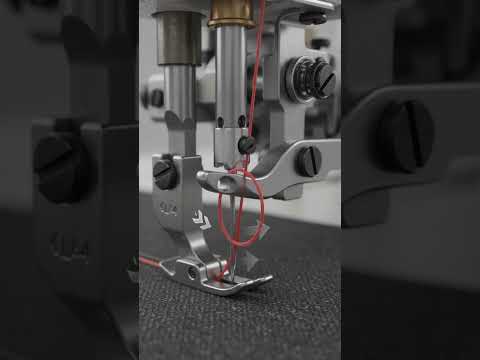
In today's fast-paced digital landscape, visual representation is everything. Whether you are an engineer showcasing a groundbreaking product design or a digital artist bringing complex mechanical movements to life, achieving high-fidelity visuals is essential. By bridging the gap between precise engineering tools and high-end artistic rendering, creators can transform standard 3D CAD models into photorealistic, cinematic animations.

The Power of SolidWorks Meets the Artistry of Blender

SolidWorks has long been an industry standard for mechanical design and parametric modeling. It provides unmatched precision, allowing designers to build intricate components with exact real-world dimensions and constraints. However, while traditional engineering tools excel at functional accuracy, generating cinematic lighting, lifelike textures, and dynamic camera movement often requires advanced rendering software.

This is where Blender enters the workflow. As a versatile, open-source 3D creation suite, Blender offers industry-leading rendering engines, realistic material shaders, and flexible animation tools. Integrating your 3D CAD designs into Blender opens up endless possibilities for creating studio-quality visuals, complete with accurate depth-of-field, lens flares, and physically based rendering (PBR) materials.

Key Workflow Steps for Ultra-Realism

To turn rigid mechanical assemblies into stunning animations, professional creators rely on a seamless hybrid workflow:

  1. Precision CAD Modeling: Build your assembly in SolidWorks or your preferred 3D CAD software, ensuring every joint, bolt, and moving part is structured logically.
  2. Mesh Optimization: Export your model into optimized formats like OBJ or FBX. Pay close attention to mesh density to balance detailed geometric curves with smooth rendering performance.
  3. Advanced Shading and Texturing: Import the model into Blender to assign realistic surface properties, such as brushed metals, clear glass, or subtle surface imperfections like scratches and fingerprints.
  4. Cinematic Lighting and Motion: Utilize studio lighting setups or HDRI environments alongside smooth camera movement to emphasize the sleek contours and functional design of your mechanism.

Elevate Your Visuals Today

Combining the structural accuracy of CAD software with the visual freedom of modern rendering tools is the ultimate secret to producing ultra-realistic animations. By adopting this powerful workflow, you can create compelling product visualizations, engaging marketing materials, and impressive portfolio pieces that captivate any audience.

3D CAD
Continue Reading | ความคิดเห็น

Popular Posts Today

 
Support : 3Dcadbrowser | Grabcad | 3Dcontentcentral | D | E | F | G
Copyright © 2028. Engineering 3DCad Appication - All Rights Reserved