Cad 3D Category

Showing posts with label 3D Geometry. Show all posts

Blender Noob vs PRO: Level Up Your 3D Geometry with Bridge Secrets

Thursday, September 17, 2026
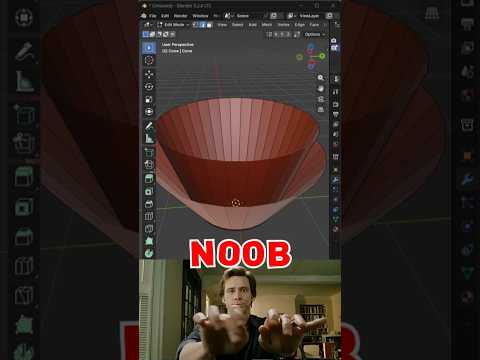
Connecting faces or filling gaps in Blender is one of the most common tasks every 3D artist encounters. While beginners often resort to tedious, manual face creation, professionals use fast and efficient workflow tricks. Mastering tools like Bridge Edge Loops allows you to clean up complex 3D geometry in seconds rather than minutes.

Whether you are building hard-surface assets or organic character models, learning how to bridge faces efficiently will transform your workflow from a Blender beginner into a seasoned pro.

The Beginner Trap vs. The Pro Approach

When starting out, most beginners select individual edges and press the F key repeatedly to build face by face. While this method works for simple flat shapes, it quickly becomes a nightmare when working with curved surfaces, hollow structures, or intricate meshes.

PRO artists, on the other hand, rely on the Bridge Edge Loops feature. By simply selecting two opposite edge loops or face regions and calling the tool, Blender automatically generates clean connecting quads between the selection. This single shortcut dramatically reduces modeling time and prevents topological errors.

Unlocking Secret Bridge Options

The real magic happens right after you execute the bridge tool. By opening the Operator Panel in the bottom-left corner of the viewport, you unlock several hidden controls:

  • Number of Cuts: Instead of a flat bridge, increase the cut count to add automatic subdivisions across the newly created section.
  • Interpolation & Profile Factor: Adjust these parameters to turn straight bridges into smoothly curved arches, pipes, or organic forms without manual sculpting.
  • Twist Offset: If your generated faces look crossed or inverted, adjusting the twist offset instantly fixes misaligned 3D geometry.

Elevate Your Modeling Workflow

Understanding how to manipulate and connect mesh elements efficiently is fundamental to high-level 3D design. By moving away from manual face creation and leveraging Blender's powerful bridging capabilities, you ensure clean, subdivision-ready 3D geometry that renders beautifully and remains easy to edit.

Give these quick bridge secrets a try in your next Blender project, and watch your 3D modeling speed double instantly!

Continue Reading | ความคิดเห็น

Cosmic Directions: Understanding the 3D Geometry of Proxima Centauri

Tuesday, September 15, 2026

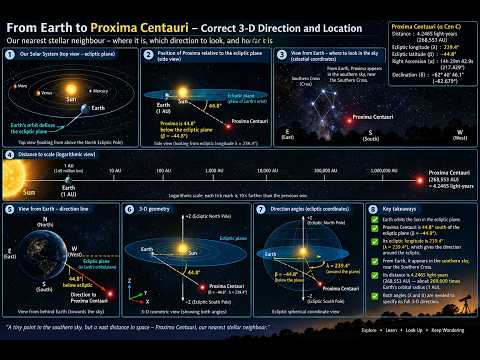
Proxima Centauri, located roughly 4.24 light-years away in the constellation Centaurus, is our solar system's closest stellar neighbor. While it has long fascinated astronomers and space enthusiasts, charting a path to this red dwarf star requires far more than a traditional flat star map. To truly understand where Proxima Centauri sits in relation to Earth, scientists rely on advanced spatial modeling powered by 3D geometry.

Mapping the Stars Beyond Two Dimensions

For centuries, stargazers mapped the night sky using standard two-dimensional coordinates: Right Ascension and Declination. While these measurements work exceptionally well for pointing a backyard telescope, they fall short of capturing the true spatial depth of the universe. Space is vast, deep, and three-dimensional.

By applying 3D geometry to modern astronomical data, researchers can convert flat celestial coordinates into accurate spatial models. This added dimension allows us to calculate not just direction, but the precise distance and physical orientation between Earth, our Sun, and the surrounding stars in the Alpha Centauri system.

Plotting the Cosmic Vector to Proxima Centauri

Determining the exact direction to Proxima Centauri involves calculating a precise three-dimensional vector through space. Astronomers achieve this by combining trigonometric parallax—the subtle shift in a star's apparent position as Earth orbits the Sun—with direct distance measurements.

When these vectors are plotted using 3D geometry, they create an intuitive visual guide of our immediate galactic neighborhood. This spatial perspective clearly illustrates how Earth and Proxima Centauri are situated relative to one another, offering a clear directional path through the cosmic void.

Why 3D Coordinates Matter for Future Exploration

As humanity looks toward interstellar exploration, mastering spatial mapping is becoming increasingly crucial. Concept missions, such as sending ultra-lightweight probes to the Alpha Centauri system, require hyper-accurate trajectory planning. Static 2D maps simply cannot account for long-distance interstellar navigation.

Ultimately, utilizing spatial math bridges the gap between theoretical astronomy and real-world spaceflight. By mapping the universe in three dimensions, we take the first essential steps toward navigating the stars and reaching our nearest celestial neighbors.

Continue Reading | ความคิดเห็น

Popular Posts Today

 
Support : 3Dcadbrowser | Grabcad | 3Dcontentcentral | D | E | F | G
Copyright © 2028. Engineering 3DCad Appication - All Rights Reserved