Cad 3D Category

Showing posts with label 3D Sculpting. Show all posts

The Cold Art of 3D Sculpting: Crafting Victor Fries in Nomad Sculpt

Tuesday, October 27, 2026
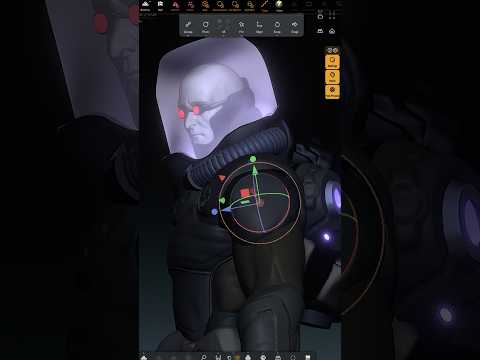
When it comes to Gotham City's dark and icy underworld, few villains are as tragic and visually iconic as Dr. Victor Fries, better known as Mr. Freeze. Bringing such a detailed comic character from two-dimensional concept art into a three-dimensional model requires technical precision, creative vision, and the right digital tools. Modern 3D sculpting allows artists to capture every chilling detail of Gotham's most infamous antagonist with unprecedented flexibility.

Bringing Gotham’s Coldest Villain to Life

Creating a compelling model of Victor Fries is all about balancing heavy mechanical armor with raw human emotion. The design process begins with blocking out the primary forms of his cryogenic suit—the reinforced shoulders, life-support mechanics, and distinct helmet structure.

By focusing on the subtle details of his expression, creators can convey the deep sorrow and cold determination that defines the character. Using digital brushes, artists carve sharp facial features, sunken eyes, and iconic comic book aesthetics that make Mr. Freeze instantly recognizable.

Mobile Workflows and Digital Clay

Mobile applications have completely transformed the 3D sculpting workflow, enabling digital artists to "cook up" complex character models directly on tablets using intuitive software like Nomad Sculpt. Gone are the days when high-end digital modeling strictly required a massive desktop workstation.

Tools like Nomad Sculpt provide powerful brush engines, dynamic topology, and real-time lighting previews in a portable package. This mobility makes it easier than ever to refine detailed character sculpts during quick work-in-progress (WIP) sessions, allowing creators to tweak proportions and polish hard-surface elements anywhere inspiration strikes.

Key Takeaways for Character Sculptors

If you are looking to create your own comic book fan art or character concepts, keep these helpful tips in mind:

  • Focus on the Silhouette: Ensure your character's overall shape and pose are strong before diving into secondary details.
  • Balance Organic and Hard-Surface Elements: Characters like Mr. Freeze require a seamless transition between organic skin textures and rigid armor plating.
  • Experiment with Atmosphere: Strategic lighting—especially cool-toned rim lights—can instantly elevate the mood of an icy sculpture.

Whether you are a beginner or an experienced practitioner, taking advantage of modern 3D sculpting on handheld devices opens up incredible new creative avenues. Pick up your stylus, launch your software, and start building your favorite comic legends in 3D today.

Continue Reading | ความคิดเห็น

Mastering 3D Sculpting for Custom Jewelry: From Blockout to Detail in ZBrush

Saturday, October 17, 2026

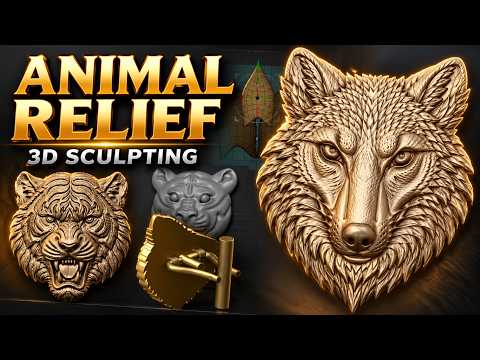
Crafting high-end custom jewelry has evolved significantly with modern technology. Whether you are creating fierce animal motifs like a detailed tiger head or refined accessories like fox head cufflinks, mastering 3D sculpting in ZBrush opens up endless possibilities for jewelry designers looking to push creative boundaries.

In this guide, we will explore key tips and techniques to take your digital jewelry designs from basic blockouts to production-ready masterpieces.

1. The Power of Blocking: Laying the Foundation

Every impressive sculpt starts with a solid foundation. Before diving into fine fur textures or intricate facial features, focus on the primary forms. Blocking out the base mesh is one of the most crucial stages in digital 3D sculpting.

By using basic primitives—such as spheres and cylinders—you can quickly establish the accurate proportions and silhouette of an animal head. Getting the silhouette right early on saves hours of refinement later and ensures your jewelry piece maintains structural balance when 3D printed and cast into precious metals.

2. Utilizing Nanomesh for Intricate Jewelry Details

Adding repeating textures, scales, or micro-patterned embellishments manually can be exhausting. This is where ZBrush’s Nanomesh tool becomes a game-changer for jewelry artists:

  • Speed and Efficiency: Instantly duplicate geometric patterns across polygroups.
  • Non-Destructive Editing: Adjust the scale, orientation, and placement of details on the fly.
  • Optimized Performance: Keep your workspace responsive while managing dense, complex surface textures.

Whether you are building stylized fur accents or decorative bands on custom cufflinks, Nanomesh lets you achieve high-density detail cleanly and efficiently.

3. Refining Form and Preparing for Production

Once your secondary details and Nanomesh patterns are in place, focus on the functional aspects of jewelry design. Ensure wall thicknesses meet casting standards, solidify hollow areas, and seamlessly blend organic forms—like a fox or tiger head—onto practical components like cufflink stems, pendant bails, or ring shanks.

Conclusion

Integrating smart digital techniques into your workflow allows you to bring bold, intricate concepts to life effortlessly. By incorporating solid blockout methods and powerful features like Nanomesh into your 3D sculpting toolkit, you can elevate your craft and produce stunning, professional-grade jewelry pieces that capture attention.

Continue Reading | ความคิดเห็น

Meshy 7 Review: Is This AI Tool the Future of 3D Sculpting?

Thursday, September 24, 2026

The landscape of digital creation is shifting at an unprecedented pace. If you’ve ever spent hours meticulously pulling vertices or mastering complex digital brushes, you know that the traditional 3D sculpting process is as demanding as it is rewarding. However, Meshy 7 has arrived on the scene, and it’s making a bold claim: AI-powered 3D modeling has finally reached a professional standard.

From Sketches to Reality in Seconds

Meshy 7 isn't just another incremental update; it feels like a genuine breakthrough in generative technology. The platform allows users to transform simple text prompts, rough sketches, or basic 2D images into fully realized 3D assets. For those who find the steep learning curve of professional 3D sculpting software intimidating, Meshy 7 offers a bridge, turning conceptual ideas into usable geometry in a matter of seconds.

The "Image-to-3D" feature is particularly impressive. By feeding the AI a single reference image, it can infer depth and volume, creating a mesh that previously would have taken a skilled artist hours to block out.

Enhanced Quality and Precision

What truly sets version 7 apart from its predecessors is the sheer fidelity of the output. The topology is cleaner, the textures are significantly sharper, and the structural integrity of the generated models is vastly improved.

Whether you need a stylized character for an indie game or a complex prop for a virtual environment, the AI understands form with surprising accuracy. This makes it an incredible tool for rapid prototyping. Artists can now generate a high-quality base in Meshy 7 and then export it into their favorite suite for final 3D sculpting refinements and detailing.

A New Era for Digital Creators

Ultimately, Meshy 7 isn't designed to replace the artist; it is designed to empower them. By automating the most tedious parts of the 3D pipeline—the initial blocking and UV unwrapping—it frees up creators to focus on the high-level creative direction.

If you are a hobbyist looking to break into the world of 3D or a professional looking to speed up your production workflow, Meshy 7 is a game-changer. It proves that AI-driven modeling is no longer just a gimmick; it is a powerhouse tool ready for the big leagues.

Continue Reading | ความคิดเห็น

Unleashing Creativity with ZBrush 3D: A Showcase of My Latest Sculpts and Tips

Monday, September 21, 2026

Are you ready to dive into the mesmerizing world of digital sculpting? Whether you are a seasoned character designer or just beginning your journey in digital art, working with ZBrush 3D offers an unparalleled creative experience. Today, I am excited to share a showcase of my latest sculpts, along with a few essential tips to help you level up your digital sculpting workflow.

Bringing Characters to Life with ZBrush 3D

Creating detailed 3D models requires both artistic patience and the right set of tools. Over the past few months, I’ve been experimenting with dynamic forms, intricate textures, and detailed hard-surface elements. ZBrush 3D remains the industry-standard software for digital sculpting, allowing artists to translate raw imagination into high-poly, production-ready assets.

In my latest video, I walk you through several of my recent sculpted pieces. From initial block-outs using basic primitives to refining fine pore details and anatomical structures, each model represents a unique set of challenges and learning moments. Observing how light hits sculpted surfaces can dramatically change the impact of your artwork, making solid form and proportion crucial right from step one.

Quick Tips for a Better Sculpting Workflow

If you want to enhance your sculpting speed and quality, keep these core practices in mind:

  • Master the Blocking Phase: Never rush into high-subdivision details before your base mesh proportions are rock solid.
  • Leverage Custom Brushes: Build or collect custom brushes for repeated details like skin textures, fabric seams, and hair strands.
  • Utilize Dynamic Topology: Keep your topology flexible early in the process so you can sculpt freely without worrying about polygon distribution.

Join the Community and Support the Channel

Building a strong artistic foundation takes practice, but sharing the journey makes it far more rewarding. If you enjoyed taking a peek at these sculpts and found the insights helpful, be sure to like the video and subscribe to the channel for more tips and tricks. Also, don't forget to check out our brand-new Inglorious Merch line to gear up and support our growing creative community!

Continue Reading | ความคิดเห็น

Popular Posts Today

 
Support : 3Dcadbrowser | Grabcad | 3Dcontentcentral | D | E | F | G
Copyright © 2028. Engineering 3DCad Appication - All Rights Reserved