Cad 3D Category

Showing posts with label Aerospace Engineering. Show all posts

From OnShape to Orbit: Master Engineering CAD by Designing Custom Model Rockets

Wednesday, October 21, 2026
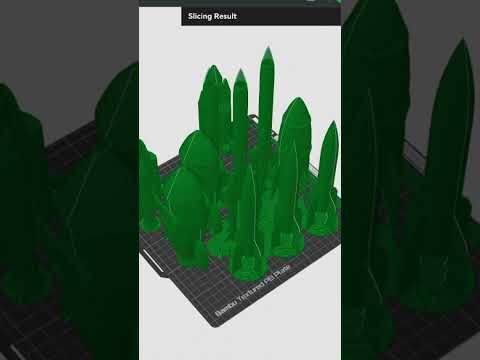
Have you ever looked at a sleek model rocket and wondered about the complex design process behind its aerodynamic frame? For many enthusiasts, the journey begins with curiosity and a high-quality 3D printer. With the rise of accessible design software and precision printing tools like Bambu Studio, the world of aerospace design is now at your fingertips.

The Power of Digital Design in Rocketry

The foundation of any successful aerospace project lies in the digital workspace. Many hobbyists start by exploring existing community designs on platforms like OnShape. By analyzing these professional-grade models, you can learn the fundamentals of structural integrity and part assembly. However, the real magic happens when you move beyond downloading and start creating.

When it comes to precision modeling, utilizing professional-grade Engineering CAD software is the first step toward creating flight-ready components. These tools allow you to iterate rapidly, testing different nose cone shapes and fin configurations before a single drop of filament is ever used.

From Inspiration to Original Design

The transition from following a tutorial to designing your own rocket is a significant milestone in any maker's journey. It involves a lot of trial and error—understanding that your first design might not be "as good" as the experts' just yet, but every iteration brings you closer to perfection.

Mastering Engineering CAD isn't just about drawing shapes; it’s about understanding tolerances, aerodynamics, and how different materials will behave under pressure. By taking inspiration from existing OnShape models, you can identify what works and then challenge yourself to improve upon those designs or customize them for specific flight goals.

Bringing Your Vision to Life with Bambu Studio

Once your digital model is perfected, the next step is the physical build. Software like Bambu Studio serves as the bridge between your computer screen and the 3D printer. It allows you to optimize your print settings, ensuring that your rocket is lightweight enough to fly but sturdy enough to survive a landing.

This process is the ultimate expression of STEM learning. It combines mathematical precision, material science, and creative engineering. Whether you are a student or a hobbyist, designing and printing your own rockets is a rewarding way to sharpen your technical skills. By consistently practicing your Engineering CAD workflows, you aren't just building a model; you are building the skills required for the future of aerospace innovation.

Continue Reading | ความคิดเห็น

A6M Zero Fighter Aircraft 3D CAD Model Download (Multi-Format)

Thursday, September 10, 2026

Preview Image

Explore and download a detailed 3D CAD model of the iconic Mitsubishi A6M Zero WWII Fighter Aircraft. Designed for visualization, historical modeling, and aerospace design reference, this technical asset is ready for integration into your engineering workflows.

Key Features & Capabilities:

  • Multi-Software Compatibility: Fully compatible with AutoCAD, SolidWorks, Autodesk Inventor, Pro/ENGINEER, PTC Creo, Siemens NX, CATIA, ACIS, and other major parametric design tools.
  • Technical Design Reference: Features refined exterior geometry accurate to the classic naval fighter plane profile.
  • Versatile Use Cases: Ideal for aerodynamic study, rendering, animation, scale modeling, and digital prototyping.

Upgrade your 3D asset library with this versatile A6M Zero CAD model today.


Continue Reading | ความคิดเห็น

A-10 Warthog 3D CAD Model: Multi-Format Download for Engineers

Wednesday, September 9, 2026

Preview Image

Enhance your aerospace design projects with this highly detailed A-10 Warthog (Fairchild Republic A-10 Thunderbolt II) 3D CAD Model. Built for precision and versatile software integration, this 3D asset is ideal for aerospace engineers, military aircraft enthusiasts, simulation developers, and CAD designers requiring accurate external geometry.

Key Features & Highlights:

  • Multi-Platform Compatibility: Ready to import into major industrial CAD software.
  • Accurate External Airframe: Detailed representation of the iconic close-air-support attack aircraft, including twin-engine layout and signature airframe structure.
  • Flexible Workflows: Perfect for visualization, spatial layout studies, rendering, and aviation reference modeling.

Supported CAD Software Formats:

This model is compatible with a wide range of parametric and direct modeling software, including:

  • SolidWorks & CATIA
  • Autodesk Inventor & AutoCAD
  • PTC Creo / Pro-ENGINEER
  • Siemens NX
  • ACIS and standard neutral 3D file formats

Download this versatile A-10 Warthog CAD file today to streamline your modeling and simulation workflow.


Continue Reading | ความคิดเห็น

Popular Posts Today

 
Support : 3Dcadbrowser | Grabcad | 3Dcontentcentral | D | E | F | G
Copyright © 2028. Engineering 3DCad Appication - All Rights Reserved