Cad 3D Category

Showing posts with label CAD Tools. Show all posts

AutoCAD on the Go: Master Powerful Mobile CAD Tools Easily

Monday, September 14, 2026

The world of computer-aided design has evolved rapidly over the past few years. Gone are the days when engineers, architects, and designers were strictly tied to heavy desktop workstations to create or modify technical drawings. Today, accessing essential CAD tools directly from your smartphone or tablet is not only possible but also surprisingly efficient. The AutoCAD Mobile App brings full-fledged design capabilities right to your fingertips, allowing professionals to stay productive wherever they go.

Why Transition Your CAD Workflow to Mobile?

Working on site or traveling often requires quick adjustments to blueprints, schematics, and floor plans. Carrying a bulky laptop in the field isn't always practical. Mobile drafting applications bridge this gap by offering a portable solution without sacrificing accuracy. With intuitive touch controls, cloud integration, and real-time file syncing, you can open, view, edit, and share DWG files effortlessly from anywhere in the world.

Essential Capabilities and Mobile CAD Tools Explained

The mobile interface is carefully optimized to deliver maximum performance on smaller touchscreen devices while retaining core engineering functionality. By bringing essential CAD tools into a streamlined interface, AutoCAD Mobile enables users to perform complex drafting tasks with ease. Key features include:

  • Precision Drawing & Editing: Easily create lines, polylines, arcs, and polygons using touch controls or a digital stylus for pinpoint accuracy.
  • Layer Management: Control layer visibility, lock critical design elements, and assign distinct colors to keep your drawings structured and readable.
  • Measurement & Annotation: Take quick distance, area, and angle measurements directly on site. Add notes, dimensions, and callouts instantly to communicate revisions.
  • Cloud Synchronization: Connect seamlessly with cloud storage platforms like Google Drive, OneDrive, and Dropbox to ensure your team always works on the latest version.

Tips to Maximize Your Mobile Design Workflow

To get the best experience while drafting on a mobile device, pair your phone or tablet with a responsive stylus for finer control when selecting small vertices and snap points. Additionally, make full use of object snaps and grid lines to ensure your mobile drafts maintain professional, industry-standard accuracy.

Final Thoughts

Mobile CAD drafting is transforming how modern professionals collaborate and execute projects. Whether you are conducting site inspections or drafting preliminary concepts during your commute, mastering these mobile CAD tools will significantly boost your productivity and workplace flexibility.

Continue Reading | ความคิดเห็น

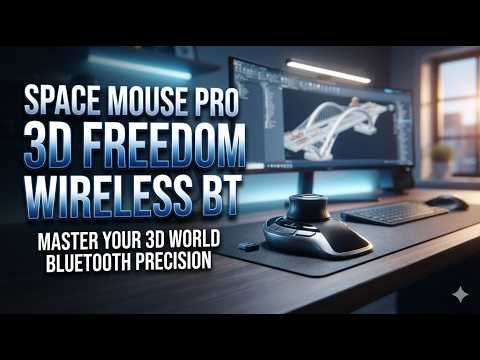
Is the SpaceMouse Pro Wireless the Ultimate Tool for 3D CAD Professionals?

Monday, September 7, 2026

Are you looking to streamline your engineering workflow and boost your daily design efficiency? For architects, product designers, and engineers working in 3D CAD software, relying solely on a traditional mouse and keyboard can feel restrictive and sluggish. Enter the 3Dconnexion SpaceMouse Pro Wireless Bluetooth Edition—a hardware controller designed specifically to transform how you interact with digital models.

Seamless 6-Degree-of-Freedom Navigation

At the core of the SpaceMouse Pro Wireless is 3Dconnexion’s patented 6-Degrees-of-Freedom (6DoF) sensor. Unlike a standard mouse that confines you to a two-dimensional plane, this 3D mouse allows you to simultaneously pan, zoom, and rotate your models with incredible precision. Navigating complex 3D CAD assemblies becomes a smooth, fluid motion, giving you an intuitive feel for your design while significantly reducing repetitive stress on your dominant hand.

Wireless Convenience Meets Ergonomic Design

Tangled cables and cluttered desks can hamper focus. The SpaceMouse Pro Wireless Bluetooth Edition addresses this by offering reliable, low-latency wireless connectivity. Coupled with a high-capacity rechargeable battery, you can work seamlessly without worrying about constant recharging.

Ergonomics are equally paramount. The full-size, soft-touch wrist rest positions your hand comfortably for long modeling sessions. Additionally, the unit features 15 programmable, tactile buttons. These include Intelligent Function Keys that automatically recognize your active software environment and map your favorite shortcuts directly to your fingertips.

Boosted Productivity for Complex Workflows

By using a two-handed workflow—holding the SpaceMouse in one hand to position the model and your traditional mouse in the other to select and edit—you eliminate thousands of tedious clicks each day. This dual-handed approach not only speeds up execution but also helps maintain your creative momentum without constant menu hunting.

Final Verdict: Is It Worth It?

If you spend hours every day rendering, drafting, or animating, upgrading your hardware is one of the smartest investments you can make. The 3Dconnexion SpaceMouse Pro Wireless bridges the gap between your physical hand and digital design space, making it a powerful asset for any serious 3D CAD professional looking to maximize precision and comfort.

Continue Reading | ความคิดเห็น

Popular Posts Today

 
Support : 3Dcadbrowser | Grabcad | 3Dcontentcentral | D | E | F | G
Copyright © 2028. Engineering 3DCad Appication - All Rights Reserved