Cad 3D Category

Showing posts with label Artificial Intelligence. Show all posts

Why I Turned Down Free Help to Build My Next 3D Asset with AI

Sunday, October 18, 2026

In the world of indie game development, "free help" sounds like a dream come true. When you are balancing coding, sound design, and marketing on a shoestring budget, a volunteer’s hand can feel like a lifeline. However, after successfully releasing two games, I recently did the unthinkable: I turned down a generous offer of free assistance and decided to rely on Artificial Intelligence instead.

While it might seem counter-intuitive, this decision wasn't about ego—it was about the hard-learned lessons of project management and the evolving power of modern technology.

The Hidden Cost of "Free"

One of the biggest hurdles for any solo developer isn't just the workload; it’s the management overhead. When you bring another person into a project, even for free, you become a manager. You have to communicate vision, provide feedback, and handle scheduling. For an indie developer, the time spent managing a volunteer often outweighs the time saved on the task itself.

By choosing to use AI, I maintained total creative control and eliminated the "waiting game." I didn't have to wait for an email response or worry about a volunteer losing interest halfway through.

Streamlining the 3D Asset Pipeline

The most significant shift in my workflow has been how I approach visual elements. In the past, creating a high-quality 3D asset meant either spending days modeling it from scratch or coordinating with an artist to ensure the style matched my world. If the proportions were off, it meant another round of revisions and more lost time.

Using AI-assisted tools, the process of generating a complex 3D asset has been cut down to a fraction of the time. I can now iterate on concepts in real-time, refining the geometry and textures until they perfectly fit the atmosphere of my game. This immediacy allows for a level of experimentation that simply isn't possible when you are relying on a third party.

Efficiency is the New Indie Standard

The goal of using AI isn't to replace human creativity, but to amplify it. For a solo dev, speed is a competitive advantage. When I can generate, rig, and implement a 3D asset in a single afternoon, I can spend more time focusing on what really matters: gameplay and player experience.

Ultimately, turning down free help allowed me to stay lean and keep my momentum. AI has become the ultimate "silent partner," providing the efficiency I need to bring my third game to life without the logistical headaches of traditional collaboration. For the modern indie developer, the future isn't just about working harder—it’s about working smarter with the tools at our fingertips.


Continue Reading | ความคิดเห็น

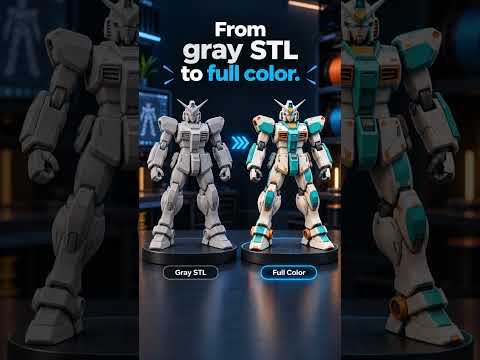
How to Automatically Color Your 3D Asset with PrintNext Color Studio

Tuesday, October 6, 2026

The world of 3D creation is evolving rapidly, and the days of spending hours manually painting textures or assigning materials are quickly coming to an end. For designers, hobbyists, and engineers alike, the most time-consuming part of the workflow is often the aesthetic finish. Enter PrintNext Color Studio, a revolutionary AI-powered tool designed to breathe life into your models with just a few clicks.

The New Era of Automated Texturing

Coloring a complex model used to require deep knowledge of UV mapping and digital painting software. However, PrintNext Color Studio leverages artificial intelligence to handle the heavy lifting. By simply uploading your 3D asset, you can bypass the technical hurdles that often stall the creative process. This tool is specifically built to understand geometry and context, ensuring that colors are applied logically and beautifully.

How PrintNext Color Studio Works

The process is remarkably intuitive, making it accessible even to those who are new to the 3D space. First, you start by importing your chosen 3D asset into the PrintNext platform. Once the model is loaded, you don't need to pick up a virtual brush. Instead, you use natural language prompts to describe your vision.

Whether you want a "weathered metallic look," "vibrant neon aesthetics," or "realistic organic tones," the AI interprets your description and maps the colors directly onto the surface of the model. This automation allows for rapid prototyping, enabling you to see multiple color iterations in a fraction of the time it would take to do manually.

Efficiency for Creators and Makers

For the 3D printing community, this is a game-changer. Preparing a 3D asset for a multi-color print or a high-quality render often requires meticulous attention to detail. PrintNext Color Studio streamlines this by providing professional-grade results automatically.

By integrating AI into the texturing phase, creators can focus more on the structural design and the final print quality rather than getting bogged down in the minutiae of color application. As AI continues to integrate with manufacturing and design, tools like PrintNext are proving to be essential for anyone looking to stay ahead in the digital fabrication landscape.

If you are looking to save time and enhance the visual appeal of your projects, it is time to let PrintNext Color Studio handle the palette while you handle the innovation.

Continue Reading | ความคิดเห็น

Hands-Free CAD: How I Used AI for Fusion 360 3D Modeling and Printing

Monday, September 28, 2026

Imagine stepping away from your mouse and keyboard, letting Artificial Intelligence take the driver’s seat in your CAD workflow. It sounds like science fiction, but combining generative AI with Fusion 360 3D design is changing how makers, engineers, and digital artists approach modeling today.

In my latest project, I decided to test this futuristic workflow by letting AI handle the heavy lifting of designing custom lamps, which were then brought to life using a 3D printer. Here is how AI and modern CAD software come together to redefine physical product design.

Stepping Away from the Mouse: How AI Meets CAD

Traditional CAD design often requires hours of manual sketching, extruding, and tweaking parameters to get complex geometry just right. However, modern AI algorithms can analyze prompts or functional parameters to suggest intricate shapes and structural patterns in seconds.

By feeding specific aesthetic and functional instructions into AI tools, I was able to generate complex parametric light fixture concepts. Instead of spending hours plotting curves manually, the AI established the foundational geometry, allowing me to refine and optimize the result inside the Fusion 360 3D environment. This hybrid approach significantly reduces development time while opening doors to organic designs that are typically difficult to draft from scratch.

From Digital Render to Physical Light

Once the AI-assisted model reached perfection, the next step was turning digital vectors into physical reality. Designing a lamp comes with practical challenges: you must balance aesthetic appeal with functional requirements like wall thickness, heat ventilation, and light diffusion.

Exporting the finalized model from the Fusion 360 3D workspace into slicing software was seamless. The dimensional precision of CAD paired with the unique aesthetics generated by AI created a finished product that looks both modern and artistic. Once sent to the 3D printer, layer by layer, the glowing luminaire came to life.

Is AI the Future of 3D Design?

While AI won't completely replace human creators, it serves as an incredibly powerful co-pilot. Combining AI-driven creative inspiration with robust technical software allows makers to bypass creative block, speed up prototyping, and push the boundaries of additive manufacturing.

Are you ready to experiment with AI in your next project? Step out of your traditional workflow, leverage smart automation, and see what you can create!

Continue Reading | ความคิดเห็น

Text to 3D CAD: How AI-Powered Multi-Agent Systems Are Changing Manufacturing

Thursday, August 20, 2026

Imagine describing a physical object in plain English and watching a complete, 3D printable file materialize in seconds. What once sounded like science fiction is now becoming a reality through cutting-edge artificial intelligence. Enter MAC (Multi-Agent CAD), an innovative system designed to bridge the gap between simple text prompts and functional manufacturing models.

What is Multi-Agent CAD (MAC)?

Traditional 3D CAD software often requires years of practice, precise mathematical inputs, and complex manual drafting. MAC changes this paradigm by using a collaborative network of specialized AI agents. Instead of relying on a single AI model to guess the exact geometry of an object, MAC splits the workload among multiple intelligent agents. Some agents analyze the text prompt, others generate the underlying parametric code, and additional agents inspect the design to ensure structural viability.

This multi-agent approach allows the system to generate clean, editable, and highly accurate parametric models rather than distorted 3D meshes. By translating descriptive text directly into code-based geometry, MAC creates physical parts that are optimized for production and ready for 3D printing.

Why Text-to-CAD Technology Matters

The integration of generative AI into 3D CAD workflows brings several major advantages to engineers, industrial designers, and hobbyists alike:

  • Rapid Prototyping: Turn creative concepts into physical objects without spending hours on initial sketching and baseline modeling.
  • Accessibility: Lower the barrier to entry, allowing non-experts to generate custom parts without navigating steep software learning curves.
  • Parametric Accuracy: Because MAC produces code-driven geometry rather than mere visual surfaces, the output remains fully customizable, precise, and structurally sound.

The Future of Digital Design

While human expertise remains essential for complex mechanical engineering, tools like MAC represent a massive leap forward for rapid design iteration. The future of 3D CAD is evolving into a hybrid process—one where humans provide creative intent and AI handles the tedious drafting tasks. Whether you are an experienced engineer or a desktop manufacturing enthusiast, text-driven CAD modeling is set to redefine how we bring digital ideas into the real world.

3D CAD
Continue Reading | ความคิดเห็น

Popular Posts Today

 
Support : 3Dcadbrowser | Grabcad | 3Dcontentcentral | D | E | F | G
Copyright © 2028. Engineering 3DCad Appication - All Rights Reserved