Cad 3D Category

Showing posts with label VFX. Show all posts

Awakening: Bringing a Hyper-Realistic 3D Character to Life in CGI

Wednesday, November 11, 2026
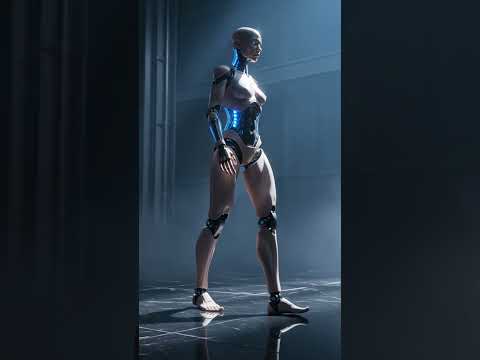
Imagine a world where the boundary between organic life and artificial intelligence blurs completely. "She wasn't supposed to wake up"—yet, in the breathtaking short film Awakening: Genesis in Steel and Skin, a hyper-realistic android opens her eyes for the very first time. This cinematic project showcases the astonishing potential of modern computer graphics, immersive storytelling, and cutting-edge visual effects.

The Art of Hyper-Realistic Digital Design

Creating a believable synthetic human is one of the most challenging feats in modern digital art. Crafting a hyper-realistic 3D character requires far more than just high-resolution textures; it demands an intricate understanding of human anatomy, subsurface light scattering, and subtle emotional expression. In Awakening, the contrast between sleek, cold steel components and soft, lifelike skin creates a striking visual dichotomy. Every pore, metallic reflection, and micro-expression works in harmony to bridge the gap between artificiality and humanity.

Breathing Life into Motion and Animation

Visual design is only half the journey. To truly captivate an audience, a digital entity must move with purpose and delicate realism. Animating a lifelike 3D character involves capturing the hesitant, fragile nature of a newly awakened consciousness taking her very first steps. By utilizing advanced rigging and high-end rendering techniques, the short film transforms a complex digital mesh into a compelling figure with a soul-stirring presence. The surrounding visual effects seamlessly integrate ambient lighting and atmospheric depth, elevating the narrative experience.

A New Era for Cinematic AI and CGI

As technology continues to evolve rapidly, the intersection of innovative AI tools and traditional 3D animation opens up limitless possibilities for creators. Projects like Awakening demonstrate how visionary artists can now produce Hollywood-grade cinematic experiences independently. Seeing a fully realized 3D character push the boundaries of digital storytelling inspires a new generation of animators and CGI enthusiasts alike.

Experience the dramatic first steps of this synthetic marvel and witness the future of digital art unfolding before your eyes.

Continue Reading | ความคิดเห็น

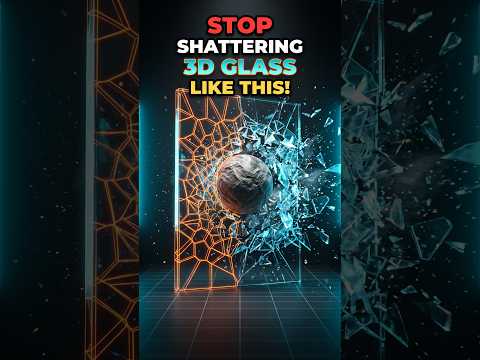
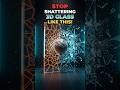
Master Realistic Glass Destruction: The Ultimate Blender 3D Tutorial

Thursday, November 5, 2026

Have you ever tried to create a shattering glass effect, only to find that it looks more like falling blocks than actual shards? You aren’t alone. Achieving high-quality, believable destruction is one of the most sought-after skills in the world of CGI. When it comes to creating high-end visual effects, mastering Blender 3D requires moving beyond basic presets and understanding how materials actually break in the real world.

The Problem with Basic Shattering

Most beginners make the mistake of creating uniform pieces that lack the chaotic variety of real glass. Real glass doesn't just split into equal cubes; it splinters into jagged shards, tiny slivers, and larger chunks based on the point of impact. If your simulation looks "off," it’s likely because the fracture pattern is too predictable. To fix this, we need to leverage the right tools and physics settings.

Step 1: Harnessing the Power of Cell Fracture

The secret to realistic destruction lies in the Cell Fracture add-on. Before you start, ensure the add-on is enabled in your preferences. Once active, you can take your mesh and apply the fracture.

The key tip here is to use a "Particle System" or "Annotation Tool" to define where the impact happens. By concentrating the fracture points around the area where the object hits the glass, you create a much more realistic radial pattern. Within the Cell Fracture settings, increasing the "Noise" value is essential—it ensures that the edges of your shards are jagged and irregular rather than perfectly straight.

Step 2: Refining Physics with Rigid Bodies

Once your glass is fractured, you need to tell the software how those pieces should move. This is where the physics engine in Blender 3D shines. By assigning a Rigid Body to your shards, you can simulate gravity, friction, and collision.

Pro-Tip: Use the "Calculate Mass" function to ensure the shards have a realistic weight. Light glass shards should behave differently than heavy concrete chunks. Additionally, don't forget to set your "Collision Margin" to a very low number to avoid shards "exploding" outward the moment the animation starts.

Final Touches for Realism

To truly sell the effect, add a touch of "Slow Motion" by adjusting the scene's time scale, and ensure your glass material has a high transmissive value with a touch of roughness on the broken edges.

Elevate your Blender 3D projects today by moving away from generic shattering and embracing the precision of Cell Fracture. With these techniques, your destruction sequences will go from "amateur" to "cinematic" in no time!

Continue Reading | ความคิดเห็น

Unlocking the Secrets of Crowd Simulation with Autodesk 3D

Sunday, November 1, 2026

Have you ever sat in a movie theater watching a historical war epic or a packed stadium scene filled with thousands of roaring fans and wondered, “How did they manage to hire so many extras?” The short answer is: they didn't!

Welcome to the fascinating world of crowd simulation, where visual effects (VFX) artists use powerful software solutions like Autodesk 3D suites to populate massive cinematic worlds with realistic digital human beings.

What is Crowd Simulation in VFX?

In modern filmmaking, coordinating thousands of real human extras is expensive, time-consuming, and logistically challenging. Crowd simulation is a specialized branch of visual effects where computer software generates hundreds, thousands, or even millions of autonomous digital characters—known as "agents"—within a single scene.

Rather than animating each character individually, artists give these digital extras unique behaviors, dynamic movements, and realistic physics so they act naturally within their environment.

How Do Artists Create Massive Digital Crowds?

Creating a believable digital crowd involves a seamless blend of technology and artistry:

  1. Character Modeling: Artists design several base 3D character models with variations in clothing, height, and textures to avoid noticeable duplication.
  2. Motion Capture (MoCap): Stunt actors and performers record foundational actions—such as walking, running, cheering, or fighting—which are converted into digital animation data.
  3. Behavioral AI and Rules: Integrated within industry-standard animation workflows powered by Autodesk 3D software, artists set AI rules for digital agents. This ensures characters navigate terrain, avoid walking through each other, and react dynamically to obstacles.
  4. Rendering & Compositing: Final lighting, shadow integration, and realistic depth of field are applied so the digital crowd merges seamlessly with live-action footage.

Why Crowd Simulation is Essential for Modern Movies

Beyond saving film studios millions of dollars in production costs, digital crowd simulation gives directors complete creative freedom. Weather conditions, camera angles, and dramatic collisions can be tweaked effortlessly without coordinating thousands of real people on set.

Whether it’s an immense fantasy army clashing on a battlefield or a futuristic city bustling with civilians, crowd simulation driven by flexible Autodesk 3D tools continues to push the boundaries of modern visual storytelling. The next time you see a massive crowd on the big screen, remember—you're looking at pure digital magic!

Continue Reading | ความคิดเห็น

✨ BOT ZUN: A cute little neon robot animation | Free Download ✔

Wednesday, October 29, 2025


Meet Bot Zun, a charming and adorable 3D character robot! This model is designed with a style that emphasizes curves and bright neon colors, which makes it stand out and look even more lively. What's more, this model comes with animation, so you can use it in any game project, short animation, or presentation that requires a small, movable sci-fi character.


Model details

Details sectionInteresting details
Model typeLow Poly Robot Character
styleCute, Neon, Sci-Fi, Art & Abstract
Key featuresThere are animations (Animated) and free downloads (Free Download).
Technical informationTriangles: $21k$ (21,000), Vertices: $10.5k$ (10,500)
CreatorCREATIVE OSCAR (@oscar_creativo)
CopyrightCC Attribution (Creative Commons Attribution) – Allowed for free use, with credit given to the creator.
Recommended usage

Game: Enemy characters, NPCs, or pets in mobile or indie games.


Animation: Short clips, experimental animation scenes


Digital Art: Compose a colorful rendered scene.


🎁 Free file download link

The "BOT ZUN ANIMATION" model is a free downloadable model under the CC Attribution license:

  • Direct download link: BOT ZUN ANIMATION by Oscar Creativo

    • How to download: On the Sketchfab page, look for the "Download 3D Model" button.

    • Tip: Since these are free models with animation and rigging , the downloaded files are usually in .fbx.JPG format .gltf, which can be imported into most 3D software for immediate use (don't forget to credit the creator as per the license terms!).


Model TypeRobot, Bot, Character, Droid, Creature, 3D Model
FeaturesAnimated , Rigged , Downloadable , Free , Low Poly (from Triangles/Vertices data)
Style (Style/Genre)Cute, Neon, Sci-Fi, Art, Abstract, Cartoon, Stylized
ApplicationGame Asset , Animation , VFX , Unity , Unreal (if converted), 3D Design , Render
Specific KeywordsZun, Bot Zun, Collection, Cinema4D, Download Free, Free3Dmodel


Continue Reading | ความคิดเห็น

Popular Posts Today

 
Support : 3Dcadbrowser | Grabcad | 3Dcontentcentral | D | E | F | G
Copyright © 2028. Engineering 3DCad Appication - All Rights Reserved