Cad 3D Category

Showing posts with label 3D Graphics. Show all posts

Visualizing Photosynthesis: The Calvin Cycle Explained with 3D Graphics

Friday, November 13, 2026
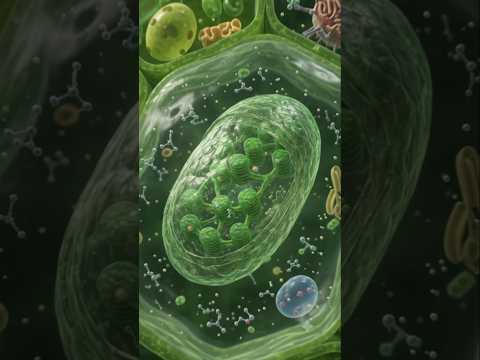
Understanding cellular biology can often feel like trying to decipher an invisible world. Among the most crucial biological processes on Earth is photosynthesis, specifically the light-independent reactions known as the Calvin Cycle (or C₃ Cycle). While traditional textbooks rely on static diagrams, modern educational tools leveraging high-definition 3D graphics make complex biochemical pathways remarkably easy to comprehend.

What is the Calvin Cycle?

The Calvin Cycle is the second stage of photosynthesis, where plants convert carbon dioxide taken from the air into glucose—the sugar that fuels plant growth. Unlike the light-dependent reactions that require direct sunlight, the Calvin Cycle takes place inside the fluid-filled space of the chloroplast known as the stroma. It functions as a continuous chemical loop to synthesize vital organic compounds.

The Three Core Stages of the C₃ Cycle

To truly grasp how plants turn atmospheric gas into organic energy, it helps to break the cycle down into three distinct phases:

  1. Carbon Fixation: The enzyme RuBisCO facilitates the attachment of carbon dioxide (CO₂) to a five-carbon molecule called RuBP. This forms an unstable six-carbon compound that quickly splits into two molecules of 3-PGA.
  2. Reduction: ATP and NADPH (generated during light-dependent reactions) donate energy and electrons to convert 3-PGA into G3P, a high-energy three-carbon sugar. A portion of this G3P exits the cycle to build glucose and other carbohydrates.
  3. Regeneration of RuBP: The remaining G3P molecules undergo a series of complex chemical rearrangements powered by ATP to regenerate RuBP, preparing the chloroplast to accept new carbon dioxide molecules.

Why Visualizing Biology Matters

Observing molecular interactions on a microscopic level can be challenging with text alone. Utilizing realistic 3D graphics allows students, educators, and science enthusiasts to observe how enzymes and molecules physically bend, bond, and transform in real time.

By stepping inside the chloroplast through dynamic 3D graphics, abstract biological concepts become clear and memorable. Whether you are preparing for a biology exam or simply curious about how plant life sustains our atmosphere, visual step-by-step breakdowns bridge the gap between complex chemical formulas and intuitive learning.

Continue Reading | ความคิดเห็น

Why PS1 Graphics Jitter: The Technical Secret Behind Retro 3D Texture Warping

Tuesday, November 10, 2026

If you grew up gaming in the mid-1990s, the original PlayStation (PS1) likely holds a special place in your heart. However, replaying those classic 32-bit titles today highlights a very distinct visual quirk: 3D models tend to wobble, and wall surfaces seem to "swim" as your character moves. But what actually caused this iconic phenomenon?

The answer lies in the hardware limitations of the early 3D console era and how the system processed geometric data.

Affine Mapping and the "Swimming" Effect

The main reason graphics appear to stretch and warp on the PS1 comes down to how polygons were rendered on screen. Modern graphics hardware uses perspective-correct texture mapping, which continuously calculates depth along the Z-axis for every pixel.

The PS1 graphics chip, however, lacked hardware support for perspective correction. Instead of calculating true 3D perspective for a 3D texture, the console used a lightweight rendering technique called affine texture mapping. Affine mapping maps textures linearly across 2D polygons on the screen. As an object moves closer to or farther from the camera, the hardware fails to account for depth changes, causing the 3D texture to warp and distort across the surface of the geometry.

Fixed-Point Math and Vertex Wobble

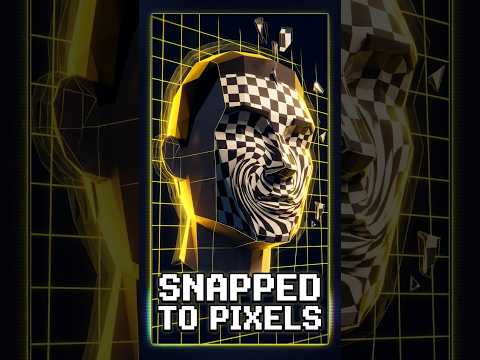
Along with texture warping, PS1 games are famous for their jittery 3D models. This visual glitch stems from the console's reliance on fixed-point math rather than floating-point math within its Geometry Transfer Engine (GTE).

Because the hardware lacked floating-point precision, 3D vertex coordinates had to be rounded to the nearest pixel grid coordinate on the screen. As a character or camera shifted, vertex points would violently "snap" to the nearest integer pixel rather than transitioning smoothly across sub-pixels. This sub-pixel snapping created the noticeable shaking or wobbling effect retro gamers know so well.

Furthermore, the PS1 lacked a dedicated Z-buffer (depth buffer) to keep track of depth ordering. Developers had to manually sort polygons from back to front using ordering tables, which often caused textures and polygons to flicker or pop through one another when rendered closely together.

The Legacy of 32-Bit Rendering

Despite these technical constraints, developers crafted legendary titles by employing creative workarounds, such as subdividing large polygons into smaller pieces or utilizing heavy draw-distance fog.

Today, what was once a visual flaw has evolved into a beloved stylistic choice for modern indie horror games. Learning how early hardware rendered every 3D texture gives us a fresh appreciation for the pioneering developers who laid the groundwork for modern graphics.

Continue Reading | ความคิดเห็น

Transforming Digital 3D Graphics into Reality: Flashforge Creator 5 Review

Saturday, October 31, 2026

A New Era of Multi-Tool 3D Printing

Bringing complex digital 3D graphics off the computer screen and into the physical world has always presented unique challenges, especially when dealing with multi-color and multi-material designs. Traditional single-extruder 3D printers often waste an immense amount of time and expensive filament "flushing" colors between layer transitions. The new Flashforge Creator 5 solves this frustration head-on with an innovative multi-toolhead system designed to maximize efficiency, speed, and print quality.

Four Tools, Minimal Filament Waste

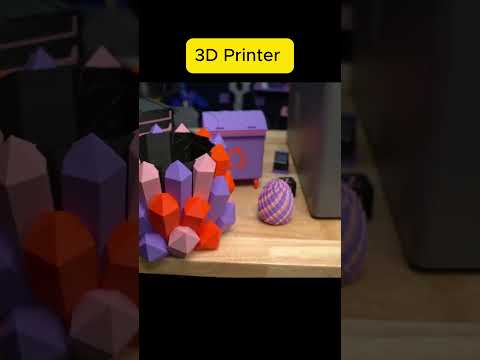
The standout feature of the Flashforge Creator 5 is its four distinct toolheads. Instead of relying on a single nozzle to alternate between multiple filaments—which leads to long purge times and excessive wasted plastic—the Creator 5 switches seamlessly between separate tools.

This multi-tool architecture is a true game-changer for makers, designers, and engineers who work with intricate 3D graphics. Whether you are printing vibrant multi-colored prototypes, complex functional components, or multi-material models requiring dedicated soluble supports, the Flashforge Creator 5 reduces material flushing to an absolute minimum. The result is faster overall print times, sharper color separation, and significantly reduced operating costs.

Elevate Your Digital Workflow

Beyond its superior color-handling capabilities, the Flashforge Creator 5 offers a robust build volume, excellent structural stability, and seamless software integration. It bridges the gap between digital design and physical manufacturing, allowing creators to materialize detailed 3D graphics with unprecedented ease, accuracy, and reliability.

If you are looking to upgrade your additive manufacturing setup, now is a great time to buy. You can use the exclusive discount code C5CREATOR30 on the official website to get an extra $30 off the current promotional price.

Continue Reading | ความคิดเห็น

From 0-Bit to Stunning 3D Graphics: The Visual Evolution of Sonic the Hedgehog

Tuesday, October 20, 2026

Since his debut in 1991, Sonic the Hedgehog has been the ultimate symbol of speed and attitude in the gaming world. However, the "Blue Blur" we see today is a far cry from the flickering pixels of the early nineties. To truly appreciate how far our favorite hedgehog has come, we need to take a nostalgic trip through a "bit battle" that tracks his transformation from a primitive concept to a modern icon.

The Era of Pixels and Sprites

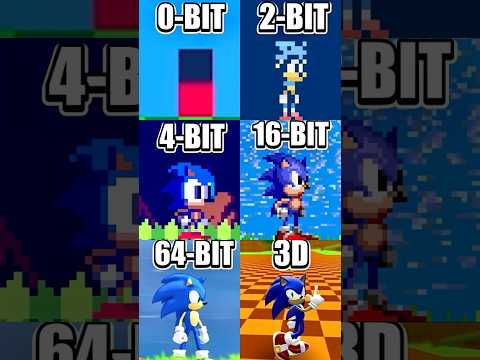
In the beginning, Sonic’s design was constrained by the hardware of the time. The evolution starts with theoretical 0-bit and 2-bit interpretations—simple, blocky shapes that capture the essence of Sonic using minimal data. As we move into the 8-bit era of the SEGA Master System and Game Gear, we see the birth of the iconic silhouette, though limited by a small color palette and basic animations.

The true "Golden Age" for many fans arrived with the 16-bit power of the SEGA Genesis. This era introduced fluid animations and vibrant environments that allowed Sonic’s speed to truly shine. The jump to 32-bit and 64-bit further refined these sprites, adding layers of detail and smoother movement that pushed 2D art to its absolute limit.

The Leap into 3D Graphics

The most significant turning point in the franchise occurred when the series moved away from flat planes and embraced the world of 3D graphics. This transition wasn't just a visual upgrade; it changed the very nature of how we experience speed. With the introduction of 3D graphics, players could finally explore the environments of Green Hill Zone and beyond from every angle, bringing a sense of scale and immersion that was previously impossible.

Modern titles have taken this even further. Today’s hardware allows for high-fidelity 3D graphics that feature dynamic lighting, realistic textures, and complex physics. Whether he is running through a futuristic city or a lush jungle, the depth provided by modern rendering techniques makes Sonic feel more alive than ever before.

Why the Evolution Matters

Watching the progression from a handful of pixels to a fully realized cinematic character is a testament to the rapid advancement of technology. This "bit battle" highlights not just the technical achievements of developers, but the enduring design of a character who remains recognizable whether he is composed of four blocks or four million polygons. As hardware continues to evolve, one thing remains certain: Sonic will keep running toward the next visual frontier.

Continue Reading | ความคิดเห็น

The Secret of the Infinite Chocolate Bar: How 3D Graphics Reveal the Truth

Friday, October 9, 2026

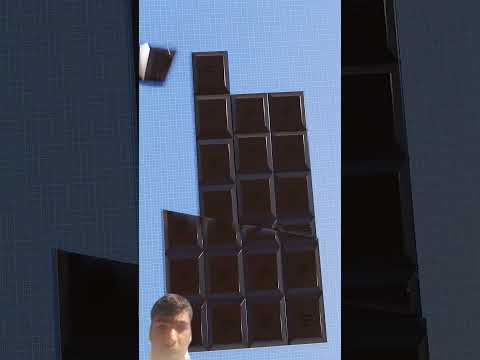
We’ve all seen it—the viral video where a standard chocolate bar is sliced, shifted, and put back together, only for a single square to remain as a "bonus" piece. It seems to defy the laws of physics. How can you have more chocolate than you started with? The answer lies in a clever geometric illusion that is best understood when broken down through the lens of modern 3D graphics.

The Mystery of the Infinite Snack

The infinite chocolate bar trick, often associated with geometric paradoxes, relies on the human eye's inability to track minute changes in surface area. When the bar is cut at a specific diagonal angle, the total area is redistributed. To the naked eye, the bar looks identical to its original state once rearranged, but in reality, a subtle change has occurred. Because the "new" bar looks full, the extra square seems like magic.

Visualizing the Illusion with 3D Graphics

While it is difficult to see the "cheat" with a real chocolate bar on a shaky camera, using high-quality 3D graphics allows us to see the gap that the human eye usually misses. In a digital animation, we can slow down the movement and zoom in on the seams where the pieces meet.

When the pieces are rearranged, a tiny sliver of space is distributed across the entire width of the bar. This missing area is exactly equal to the size of the "extra" square. By utilizing 3D graphics, creators can show the exact measurements, proving that the resulting bar is actually a fraction of a millimeter shorter than the original. It is the perfect marriage of mathematics and digital art.

Why Our Brains Get Fooled

The trick works because our brains prioritize the overall shape (the rectangle) over the exact height or length of the object. We see a completed rectangle and assume it is the same size as the one before. This visual "sleight of hand" is a masterclass in geometry.

The next time you see a video claiming to have found a "glitch in the matrix" with a chocolate bar, remember that it isn't magic—it’s just clever cutting and a bit of mathematical trickery brought to life through the power of animation. While we might not get infinite chocolate in real life, we can certainly enjoy the satisfying way digital tools explain the impossible.

Continue Reading | ความคิดเห็น

Popular Posts Today

 
Support : 3Dcadbrowser | Grabcad | 3Dcontentcentral | D | E | F | G
Copyright © 2028. Engineering 3DCad Appication - All Rights Reserved