Cad 3D Category

Showing posts with label 3D Art. Show all posts

Master 3D Modeling: Creating Your Own Among Us Crewmate in Blender

Sunday, October 25, 2026
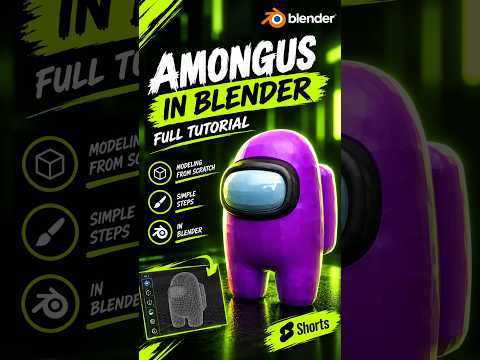
Among Us captured the world with its simple yet iconic designs and tense social gameplay. While we are all used to seeing the 2D sprites running around the Skeld, there is something incredibly satisfying about seeing those "sus" characters in a three-dimensional space. If you have ever wanted to transition from a player to a creator, learning the fundamentals of 3D modeling is the perfect place to start.

Why Start with an Among Us Character?

For beginners, the Among Us crewmate is one of the best subjects to practice with. Its design is comprised of simple, clean geometric shapes—essentially a rounded "bean" with a visor and a backpack. This simplicity allows you to focus on the core workflow of 3D modeling without getting overwhelmed by complex anatomy or intricate textures. By using Blender, a powerful and free open-source tool, you can go from a blank screen to a finished character in just one sitting.

The Basic Workflow in Blender

To begin, you typically start with a basic primitive, such as a cube or a UV sphere. By applying a Subdivision Surface modifier, you can transform a blocky shape into the smooth, pill-like body of the crewmate. The legs are created by extruding the bottom faces of the body, ensuring that the silhouette remains consistent with the original game art.

The visor is perhaps the most important detail. By selecting the front faces of your model and using the "Inset" and "Extrude" tools, you can create the recessed look of the glass. Adding a bevel to these edges helps catch the light, giving the model a more professional, polished feel.

Adding Color and Personality

Once the geometry is finished, the real fun begins with materials. Among Us characters are known for their vibrant, flat colors. In Blender’s shading tab, you can assign bright reds, cyans, or purples to the body while giving the visor a light blue, reflective material. Don't forget the oxygen tank on the back—a simple stretched cube with rounded corners is all you need to complete the iconic look.

Take the Next Step

Creating a crewmate is a fantastic way to build your confidence. Once you master the basics of 3D modeling through this project, you can start experimenting with custom hats, different skins, or even basic animations. The jump from 2D to 3D might seem intimidating at first, but with a character this simple and a tool like Blender, the possibilities are endless. Grab your mouse, fire up your software, and start creating!

Continue Reading | ความคิดเห็น

Master the Art of Illusion: How to Create a Stunning 3D Space on Paper

Wednesday, October 7, 2026

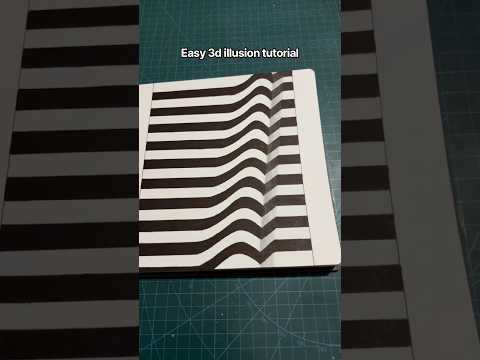
Have you ever stared at a drawing and felt like you could reach right into the page? That is the magic of optical illusions. By using clever lines, geometric patterns, and strategic shading, any artist can transform a flat, two-dimensional surface into a convincing 3D space. Whether you are a seasoned illustrator or a beginner looking for a fun weekend project, mastering the art of 3D illusions is a rewarding way to level up your drawing skills.

The Foundation of Optical Art

The secret to a successful 3D illusion lies in the mathematical precision of geometric art. Unlike traditional sketching, where you might focus on soft curves and organic shapes, 3D illusions rely on perspective. By manipulating lines and angles, you trick the human brain into perceiving depth and volume where none actually exist. This technique allows you to define a 3D space that feels immersive and tangible, even on a standard sheet of paper.

Step-by-Step: Building Your Illusion

To start your journey into the world of optical art, follow these simple phases:

  1. Establish Your Perspective: Begin by drawing light guidelines. Most illusions use a central vanishing point or a series of parallel lines that suggest a hallway or a deep pit.
  2. Define the Geometry: Use a ruler to ensure your lines are crisp. Create repeating shapes—such as squares or triangles—that gradually change in size as they move toward your focal point. This creates the immediate sensation of distance.
  3. Construct the Depth: Connect the corners of your shapes with diagonal lines. This is the critical moment where your drawing begins to transition from a flat pattern into a structured 3D space.

Mastering Contrast and Shading

The final "wow" factor of any 3D drawing comes from high-contrast shading. Most iconic optical illusions utilize a monochrome palette of black and white. By filling in alternating sections with deep black ink, you create a sense of shadow and light.

The areas you leave white will appear to "pop" toward the viewer, while the dark, shaded areas appear to recede into the distance. This push-and-pull effect is what makes the illusion come alive. Don't be afraid to experiment with gradients to make the transitions look even smoother.

Conclusion

Creating 3D art is more than just a drawing exercise; it’s a lesson in how we perceive the world around us. With a bit of patience and practice, you can turn any blank page into a mind-bending masterpiece. Grab your markers and start exploring the infinite possibilities of depth today!

Continue Reading | ความคิดเห็น

Popular Posts Today

 
Support : 3Dcadbrowser | Grabcad | 3Dcontentcentral | D | E | F | G
Copyright © 2028. Engineering 3DCad Appication - All Rights Reserved