
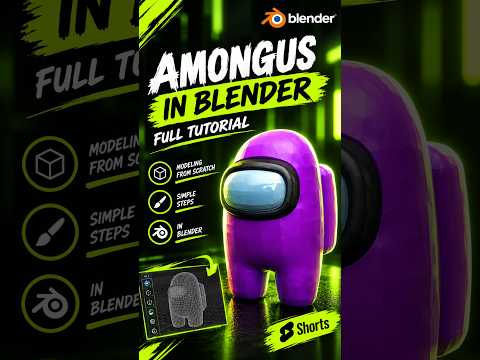
Among Us captured the world with its simple yet iconic designs and tense social gameplay. While we are all used to seeing the 2D sprites running around the Skeld, there is something incredibly satisfying about seeing those "sus" characters in a three-dimensional space. If you have ever wanted to transition from a player to a creator, learning the fundamentals of 3D modeling is the perfect place to start.
Why Start with an Among Us Character?
For beginners, the Among Us crewmate is one of the best subjects to practice with. Its design is comprised of simple, clean geometric shapes—essentially a rounded "bean" with a visor and a backpack. This simplicity allows you to focus on the core workflow of 3D modeling without getting overwhelmed by complex anatomy or intricate textures. By using Blender, a powerful and free open-source tool, you can go from a blank screen to a finished character in just one sitting.
The Basic Workflow in Blender
To begin, you typically start with a basic primitive, such as a cube or a UV sphere. By applying a Subdivision Surface modifier, you can transform a blocky shape into the smooth, pill-like body of the crewmate. The legs are created by extruding the bottom faces of the body, ensuring that the silhouette remains consistent with the original game art.
The visor is perhaps the most important detail. By selecting the front faces of your model and using the "Inset" and "Extrude" tools, you can create the recessed look of the glass. Adding a bevel to these edges helps catch the light, giving the model a more professional, polished feel.
Adding Color and Personality
Once the geometry is finished, the real fun begins with materials. Among Us characters are known for their vibrant, flat colors. In Blender’s shading tab, you can assign bright reds, cyans, or purples to the body while giving the visor a light blue, reflective material. Don't forget the oxygen tank on the back—a simple stretched cube with rounded corners is all you need to complete the iconic look.
Take the Next Step
Creating a crewmate is a fantastic way to build your confidence. Once you master the basics of 3D modeling through this project, you can start experimenting with custom hats, different skins, or even basic animations. The jump from 2D to 3D might seem intimidating at first, but with a character this simple and a tool like Blender, the possibilities are endless. Grab your mouse, fire up your software, and start creating!
