
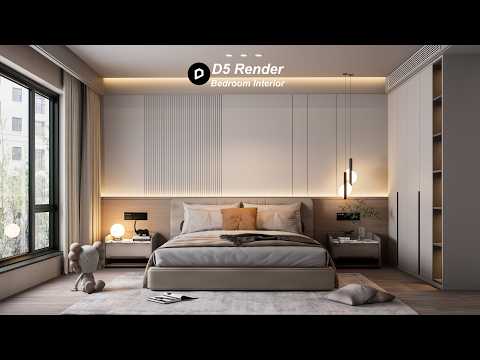
Creating photorealistic interior renders is an essential skill for modern 3D artists and interior designers. Whether you are building your geometry in 3ds Max or another modeling software, bringing your scene to life with realistic materials and lighting is where the real magic happens. In this guide, we will explore the step-by-step process of turning a bedroom scene into a breathtaking, lifelike rendering using D5 Render.
Step 1: Scene Preparation and Model Import
A convincing render begins with a well-detailed 3D model. High-poly assets—such as soft bedding, intricate light fixtures, and detailed furniture—add crucial realism to interior spaces. Once you have completed your initial architectural layout and furniture arrangement in 3ds Max, seamlessly export or sync the scene into D5 Render. Proper layering and material separation during the modeling phase will save you immense time during the texturing stage.
Step 2: Applying Realistic PBR Materials
Materials define how light interacts with your interior surfaces. To achieve maximum realism in a bedroom setting: - Fabrics & Linens: Use custom bump and normal maps to give blankets, pillows, and curtains tactile, soft textures. - Wood Surfaces: Apply high-resolution roughness maps to flooring and wooden furniture to capture realistic reflections and grain depth. - Glass & Metals: Fine-tune specular settings and metallic values on lamps, mirror frames, and window panes to create subtle specular highlights.
Step 3: Dialing in Natural and Artificial Lighting
Lighting makes or breaks interior visualization. Start by adjusting the sun direction to cast natural daylight through the bedroom windows. Soft skylight helps illuminate dark corners naturally without overexposing the scene. Next, add artificial light sources—such as warm spotlights near bedside lamps or subtle LED strips behind headboards—to add contrast, mood, and depth.
Step 4: Camera Setup and Final Output
To finish your bedroom visualization, adjust your camera angles to frame key design features. Set the focal length to mirror real-world architectural photography, avoiding unnatural lens distortion. Enable a subtle depth of field to draw focus to intricate design accents like decor pieces or fabric textures.
By pairing robust modeling techniques from 3ds Max with real-time rendering, you can create publication-ready bedroom interiors quickly and efficiently.
