
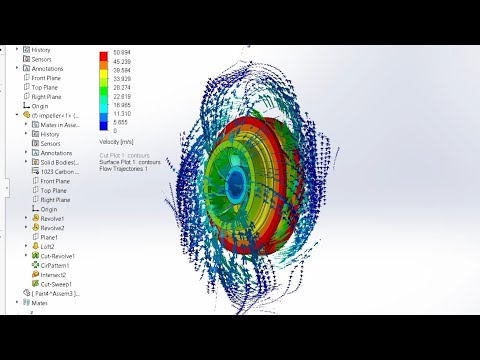
In the world of modern mechanical engineering, understanding how fluids interact with moving parts is crucial for optimizing performance and ensuring product longevity. One of the most effective ways to achieve this is through Computational Fluid Dynamics (CFD). By utilizing SolidWorks 3D, engineers can simulate complex fluid environments digitally, significantly reducing the need for expensive and time-consuming physical prototypes.
Why Use Flow Simulation for Impellers?
Impellers are the heart of various systems, from industrial pumps to cooling fans and turbines. Their efficiency depends entirely on the flow pattern of the fluid they move. By leveraging the power of SolidWorks 3D, you can analyze velocity distributions, pressure drops, and turbulence intensity in a virtual environment. This level of insight helps in identifying "dead zones" or areas of high stress that could lead to cavitation or mechanical failure before a single part is ever manufactured.
Setting Up Your CFD Analysis
The process begins with the Flow Simulation Wizard, which simplifies the setup of the computational domain. First, you define the project parameters, including the unit system and the type of fluid—whether it’s water, oil, or air. For an impeller analysis, the "Rotating Region" feature is essential; it allows the software to accurately represent the mechanical rotation of the blades. Once the boundary conditions, such as inlet mass flow and outlet static pressure, are applied, the software generates a computational mesh to prepare for the calculation phase.
Visualizing Velocity and Flow Results
Once the simulation is complete, the true power of SolidWorks 3D is revealed through its advanced visualization tools. Designers can create 3D flow trajectories and surface plots to see exactly how the fluid navigates the impeller blades. These visual representations allow you to see the velocity magnitude at any point in the flow field. By observing these results, you can make data-driven decisions to adjust blade pitch, thickness, or diameter to maximize hydraulic efficiency and minimize energy consumption.
Conclusion
Mastering CFD analysis is no longer reserved for specialists with supercomputers. With intuitive tools like Flow Simulation, any designer can refine their projects for better real-world performance. Whether you are working on industrial-scale machinery or small consumer appliances, these simulations ensure your designs are robust, efficient, and ready for the market. By integrating these tutorials into your workflow, you bridge the gap between theoretical design and optimized engineering reality.
