
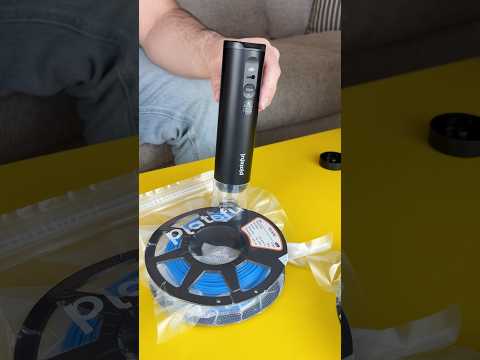
If you want consistent, high-quality prints, knowing how to properly store your 3D printer filament is just as important as mastering your machine's settings. In the fast-evolving world of 3D engineering, high-precision output requires pristine raw materials. Exposed filament absorbs moisture from the surrounding air, leading to poor layer adhesion, stringing, nozzle clogs, and brittle final parts.
Why Moisture Control Matters
Most standard 3D printing filaments—such as PLA, ABS, PETG, and especially Nylon—are hygroscopic. This means they actively draw water molecules from ambient air. When damp filament hits the hot end, trapped water turns to steam, causing crackling sounds, bubbling, uneven extrusion, and weak structural performance. In demanding 3D engineering workflows, these material defects can completely compromise functional prototypes and end-use components.
Effective Methods for Storing Your Filament
To protect your materials and ensure reliable print quality, consider integrating these practical storage solutions into your workspace:
- Vacuum Bags with Desiccant Packs: This is one of the most cost-effective methods. Storing spools in airtight vacuum bags with silica gel packets actively removes residual moisture and keeps humidity at bay.
- Airtight Storage Bins: Heavy-duty plastic containers fitted with rubber gaskets create a controlled, moisture-proof environment for multiple spools. Place a rechargeable desiccant or a digital hygrometer inside to monitor internal humidity levels easily.
- Active Filament Dry Boxes: For advanced materials, active filament dry dryers heat the spool before and during the printing process. This ensures continuous moisture removal during critical, multi-hour prints.
Elevate Your Printing Quality
Taking control of your material storage is an easy yet powerful step toward optimizing your overall 3D engineering capabilities. By protecting your spools from environmental humidity, you will reduce failed prints, save money on wasted plastic, and achieve flawless, professional-grade results every time you press print.
