
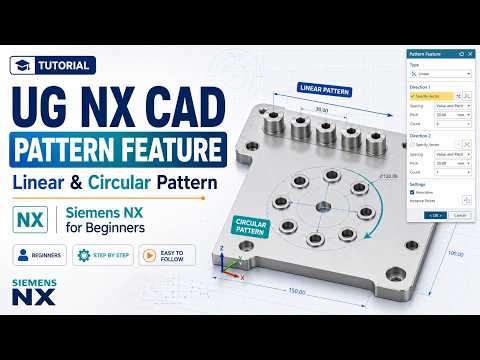
When working on complex engineering designs, manually replicating individual features can consume hours of unnecessary effort. Whether you are a student or an industry professional, mastering efficiency tools in modern 3D CAD software is essential for streamlining your modeling workflow. Among these tools, the Pattern Feature in Siemens NX (UG NX) stands out as one of the most powerful capabilities for duplicating geometric elements quickly and accurately.
In this beginner-friendly guide, we will explore how to effectively utilize Linear and Circular Patterns in Siemens NX to elevate your design process.
What is the Pattern Feature in Siemens NX?
The Pattern Feature allows designers to create multiple instances of selected features—such as holes, bosses, or slots—and arrange them in specific geometric layouts. Instead of drawing each element individually, you can define a single master feature and specify the direction, spacing, and quantity for automatic generation. This approach not only saves significant modeling time but also ensures parametric consistency across your entire design.
Mastering Linear Patterns
A Linear Pattern replicates selected features along one or two linear directions. This technique is ideal for creating arrayed components like mounting holes, heat sink fins, or structural ribs.
To create a linear pattern in Siemens NX: 1. Select the feature you wish to multiply. 2. Define the primary direction vector (such as an edge, axis, or datum line). 3. Choose your layout method (e.g., Count and Pitch, Count and Span, or Pitch and Span) and enter the values. 4. Add a secondary direction if you need to create a two-dimensional grid layout.
Mastering Circular Patterns
When designing rotational or symmetrical components—such as wheel rims, gears, flange bolt patterns, or turbine blades—the Circular Pattern option is your best choice. It distributes features evenly around a specified axis of rotation.
To execute a circular pattern: 1. Choose the target feature for replication. 2. Define the center axis of rotation and the base point. 3. Input the total number of instances and the total angular span (e.g., 360 degrees for a full circular array).
Why Pattern Features Matter in 3D CAD
Leveraging automation tools like linear and circular patterns is crucial for anyone looking to excel in 3D CAD design. Utilizing built-in pattern capabilities in your 3D CAD environment drastically reduces manual rework, minimizes design errors, and simplifies future modifications. By mastering these foundational pattern techniques in Siemens NX, you can boost your productivity and build clean, fully parametric models with confidence.

