
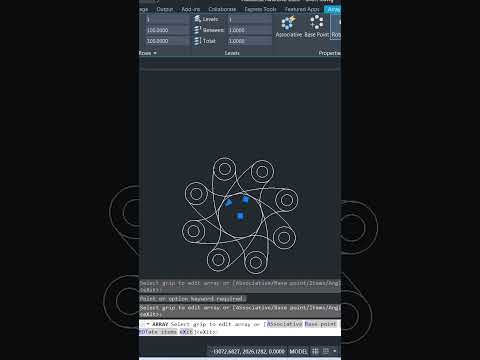
Designing symmetrical parts and mechanical components does not have to be a tedious, repetitive process. Whether you are drafting basic 2D gears, flange hole patterns, or intricate architectural features, mastering the AutoCAD Polar Array tool is an absolute game-changer. It allows designers to duplicate objects around a central axis instantly, saving valuable drafting time while ensuring mathematical precision.
What is the AutoCAD Polar Array Tool?
The Polar Array command automatically distributes copies of selected objects in a circular pattern around a specified center point. Instead of manually copying and rotating individual elements—a method prone to cumulative degree errors—the array tool calculates exact spacing and angles dynamically.
How to Create Perfect Circular Patterns Fast
Creating a polar array in AutoCAD is fast and intuitive. Follow these simple steps:
- Select the Object: Type
ARRAYPOLARin the command line (or choose the Polar Array icon from the Modify panel) and pick the geometry you want to repeat. - Specify the Center Point: Click the precise central axis point around which your objects should rotate.
- Adjust the Settings: Use the contextual ribbon tab to set the total number of items, fill angle (such as 360 degrees for a full circle), and row count.
- Close the Array: Review the dynamic real-time preview and click Close Array to finalize your pattern.
Elevating Efficiency in Modern 3D CAD Workflows
While polar arrays are a staple of 2D drafting, they play a vital role when transitioning your concepts into robust 3D CAD modeling environments. Precision at the initial sketch stage directly impacts the success of subsequent 3D operations, such as extruding circular bolt patterns, lofting complex geometries, or building rotational assemblies.
By utilizing dynamic associative arrays, you can easily tweak object counts or radial dimensions at any point later in your design pipeline. Integrating these smart circular patterns into your daily 3D CAD workflow eliminates guesswork, drastically minimizes drawing errors, and accelerates your overall project delivery. Give the polar array command a try on your next project to instantly boost your drafting productivity!

