
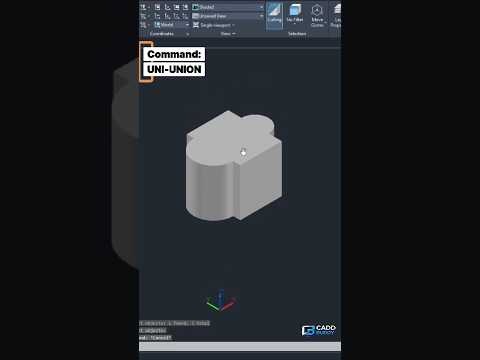
When working in modern 3D CAD software like AutoCAD, creating complex shapes often starts with combining simpler geometry. Whether you are designing mechanical parts, architectural elements, or intricate 3D models, knowing how to merge distinct objects into a single continuous solid is a fundamental skill.
That is where the UNION command comes in. In this guide, we will break down how the UNION command works and how you can use it to streamline your 3D modeling workflow.
What is the UNION Command in AutoCAD?
The UNION command in AutoCAD is a Boolean operation used to combine two or more overlapping or adjacent 3D solids, surfaces, or 2D regions into a single, unified object. Instead of managing dozens of individual shapes, UNION allows you to merge them so they act as one single piece.
This is essential for clean geometric design, accurate volume calculations, and preparing models for 3D printing or rendering.
Step-by-Step: How to Combine 3D Objects Using UNION
Combining 3D solids in AutoCAD is straightforward once you know the basic steps:
- Prepare Your Geometry: Place two or more 3D solid objects (such as boxes, cylinders, or spheres) so that they intersect or touch each other.
- Activate the Command: Type
UNION(orUNI) in the command line and press Enter. Alternatively, click the Union tool located on the Solid Editing panel under the 3D Modeling workspace tab. - Select Objects: Click on all the 3D solids you wish to combine. You can select them one by one or use a selection window.
- Execute: Press Enter or Spacebar to complete the operation.
Instantly, the intersecting inner lines between the objects will disappear, leaving you with one seamless 3D object.
Why the UNION Command is Essential for 3D CAD Professionals
Mastering Boolean operations like UNION drastically improves your efficiency when working on complex projects. Here are a few key benefits:
- Simpler Object Management: Moving, rotating, or scaling a single merged object is much easier than selecting multiple separate components.
- Clean Exporting: Many 3D printing and rendering tools require a watertight, unified mesh to process files correctly.
- Improved Performance: Reducing the overall object count keeps your drawing files lighter and smoother to navigate.
Whether you are just getting started with 3D CAD or looking to sharpen your existing modeling skills, mastering the UNION command is a crucial step toward creating professional-grade 3D designs. Give it a try in your next AutoCAD project!

