
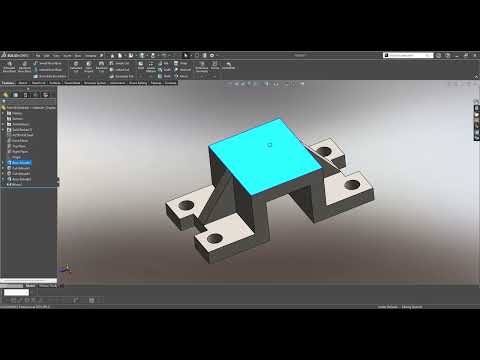
Whether you are an aspiring mechanical engineer, a product designer, or a 3D printing enthusiast, learning computer-aided design (CAD) is an essential skill. Among the leading tools in the industry, SolidWorks 3D stands out for its powerful parametric features and intuitive user interface. In this beginner-friendly guide, we will explore the fundamentals of isometric 3D modeling and show you how to turn basic 2D concepts into detailed three-dimensional models.
What is Isometric 3D Modeling?
Isometric modeling allows designers to represent three-dimensional objects clearly on a two-dimensional plane. Unlike perspective drawings, isometric views maintain parallel lines, making it significantly easier to measure dimensions accurately and visualize the spatial relationships between different features of a component. Mastering this technique provides a strong foundation for technical drawings, complex engineering assemblies, and rapid prototyping.
Core Steps to Create Your First Model
Getting started with SolidWorks 3D does not have to be overwhelming. By following a structured workflow, you can build clean, fully constrained models in just a few straightforward steps:
- Select the Orientation: Begin by choosing the appropriate reference plane (Front, Top, or Right) based on how your object will be viewed or manufactured.
- Draft the Base Sketch: Use basic geometry tools like lines, rectangles, and arcs to outline the primary shape. Always anchor your sketch to the origin point to maintain design stability.
- Apply Smart Dimensions and Constraints: Define precise measurements and geometric relations (such as parallel, perpendicular, or concentric) so your sketch is fully defined.
- Extrude into 3D: Use the Extruded Boss/Base feature to transform your 2D outline into a solid 3D object by specifying the required depth.
- Refine the Design: Add secondary features such as fillets, chamfers, or extruded cuts to finalize the detailed geometry of your part.
Key Practices for CAD Beginners
To maximize your modeling efficiency when using SolidWorks 3D, keep your initial sketches as simple as possible. It is always better to build up a complex part through multiple simple features rather than creating one overly complicated sketch. Furthermore, utilizing geometric relations instead of excessive manual dimensioning will save you valuable time when making future design revisions.
Start practicing today by recreating basic isometric shapes, and lay the groundwork for your journey into advanced 3D design!
